
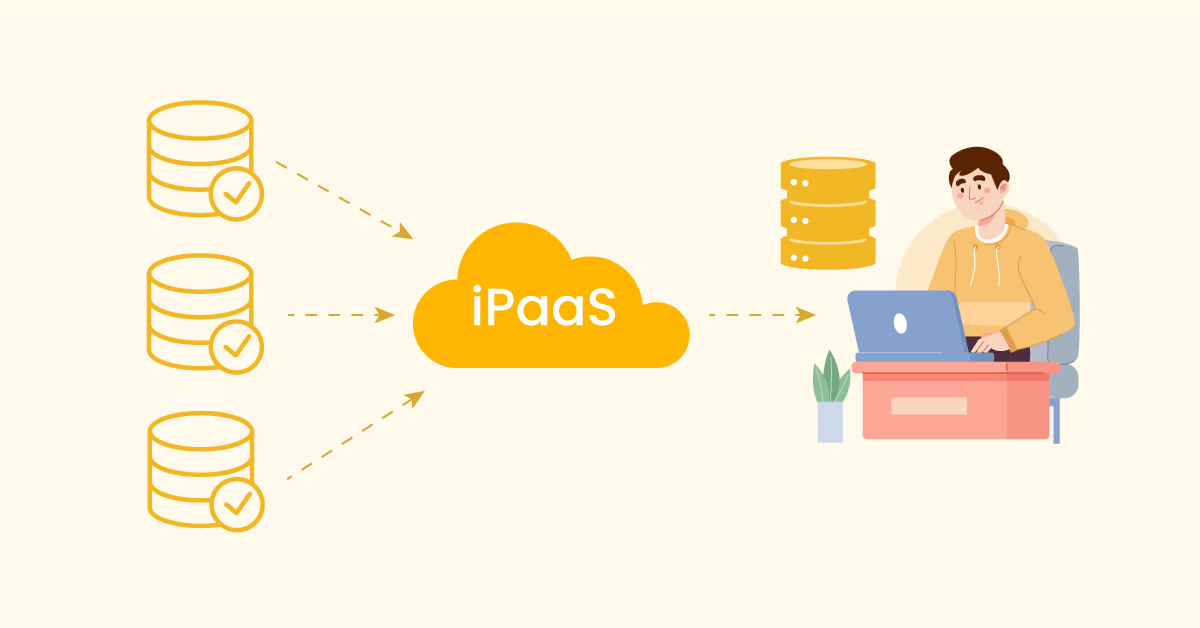
Data is everywhere. It originates from your website, social media accounts, and client transactions. It also derives from emails, support tickets, and supplier databases. Each source has its story, but all too often, these stories are disparate. That results in lost opportunities.” And businesses waste time trying to connect those dots. They are in danger of making poor decisions based on partial information. That’s a huge problem when you need to thrive in the current hyper-competitive market.
iPaaS integration and automation steps in to unify those stories, moving data seamlessly between platforms so you can focus on insights instead of extraction.
This blog will discuss iPaaS and how it allows you to integrate data from different sources. You will discover how it enhances your analytics and provides you with one unified view of your operations. By the end, you will be able to unite your data for improved insights, quicker decisions, and actual growth.
Aonflow iPaaS – Free for First 3 Months!
Build and run up to 1,500 transactions monthly with no cost. No payment info needed!
Understanding Siloed Data
Siloed data is information that remains trapped in different locations. One department can use a local spreadsheet to store data. A different software tool could be used by another team. Neither side has the whole truth. That means that every group is making decisions with incomplete information.
This could be an example where your sales team would have current stats for the latest transactions. However, your customer support team may not have visibility into those transactions. All they see are support tickets and emails. If a customer calls to inquire about a product purchased last month, the support team has to sift through old databases or contact the sales team for additional information. That makes the service process slower. That frustrates the customer, too.
Siloed data doesn’t stop with support teams. There might be a new marketing campaign on the go. They require sales data for the last six months. If that data is held in a system that marketing has no access to, it leads to guesswork. But without knowing what products sell best which markets are hottest or which customer groups bring in the most revenue, the marketing team may be running ads blind.
Data silos also prevent leaders from having visibility into the business as a whole. A manager might indicate only monthly snapshots from each department. That’s too slow and frequently stale. Which makes decisions reactive, not proactive. Over the long haul, that kills innovation. It also allows room for speedier competition.
When you forego these data silos, you own one single source of truth. You have a crystal clear view of your customers, products, finances, and so on. That’s a first step toward good analytics. This keeps you busy analyzing data instead of hunting for it across multiple sites.
When systems do not work seamlessly together, friction happens. Every system comes with its respective format, language, and interface. You can store product SKUs with one tool and shipping details with another. You may have another system for financial records. This broken flow leads to more effort.
Consequently, people keep copying data from one platform to another and pasting it. That’s time-consuming. It also leads to mistakes. A single typo can mess up your numbers for weeks. It can result in improper pricing, incorrect shipping addresses, or misdirected orders. These mistakes have monetary and temporal costs.
Another issue is that disconnected systems can’t provide each other with real-time updates. For example, suppose your e-commerce platform is selling hotcakes. Your warehouse inventory might not be real-time. You run the risk of selling things you don’t own. That results in frustrated customers who get “out of stock” notices after they complete their purchases.
Disconnected systems are more expensive and challenging to scale. If you’re looking to add in new channels, such as a mobile app or a brand new marketplace, more integration headaches. With each new channel, another home is added for data to be stored. Your system, over time, grows bigger and starts becoming brittle. Sometimes, simple changes break a perfectly functional workflow.
This fragmentation is problematic for analytics. Data scientists and analysts want to analyze trends across all business sectors. But if the finance data is one system, and the customer behavior data is another, you can’t see how they relate. Perhaps support tickets spike after a product launch. But if those systems do not communicate, you may miss the patterns. You are unable to ship the most appropriate updates to your products, or the best way to reach out to customers.
In brief, disordered systems lead to wasted efforts, increased error rates, delayed decisions, and missed opportunities. Links in a single pipeline are the key need of companies to make themselves competitive. And that’s where iPaaS comes in.
Why Data Integration Matters
Data integration, as the name suggests, is a process of integrating data from multiple sources from one perspective. That’s as simple a line as it gets, but with a huge upside.
When integration is powered by iPaaS for analytics; however, the benefits multiply. These specialized platforms keep datasets synchronized in near‑real time and feed your business‑intelligence environment without manual intervention.
One, integration is a time saver. The integrated system automates the process instead of pulling data from other tools or re-keying figures. That opens up your team to work on value-added activities. They can devote time to strategy or new ideas instead of data cleaning.
Second, integration reduces the risk of errors. Once you have the setup running, it will transfer data between your tools as needed in the correct formats. You do not depend on manual entry or on script-based extracts that break when your platform updates. Fewer mismatches or duplications mean reliable data pipelines.
Third, integration enhances analytics. Data is more pliable and resilient when it is all assembled in one place in the organization, so that it is easily accessible to analysts, and they can identify trends much quicker. They’re able to see if marketing campaigns generate more leads, whether those leads convert into sales, and if the customers stay loyal. They can see how support issues affect product returns and what product lines are the most profitable. These are insights you can’t have unless you have a full view.
Fourth, Integration enables decisions in real-time. Even the iPaaS options provide near real-time syncing. So, if you experience a spike in orders, your inventory numbers will change accordingly within minutes, as opposed to days. You can reorder products, dedicate additional staff to packing them, or change marketing strategies if an item sells out too quickly. The strategic use of real-time data can give you a significant competitive advantage.
Fifth, integration readies you for expansion. The third reason is that when your systems speak with each other, it is easier to add a new channel or new functionality. The integrated backbone already exists. You can attach a new tool, annotate the data fields, and have the pipeline do the hard work. There’s no need to knit together a hodgepodge of code whenever you want to scale up.
iPaaS for Analytics
With all your data in one place, you can do better analytics. iPaaS just brings the silos together — like a bridge that collects the data from silos. Then, it forwards that data to a single location — often, a data warehouse or an analytics platform. From there, you can run reports, create dashboards, and see trends.
What if you had only one dashboard where you link your sales figures, marketing performance, and customer feedback, including a satisfaction score? iPaaS makes that possible. It guarantees the correctness and freshness of each data point. It fetches data from places like CRM, e-commerce, advertising platforms, and support tickets. It normalizes the data and drops it into your analytics tool.
Analytics gain depth when the data is consistent. You can see correlations that were previously obscured. You may notice that your sales increase whenever your social media engagement surges. Or that customers who open your welcome email usually become repeat buyers? You’re able to follow user steps more precisely, from an initial click on your ad to a referral to a buddy.
For example, real-time data allows insights at the moment. Imagine that your new campaign is not producing any leads. Instead of waiting for a report to be finalized based on available data (which in your case might be accessible every Friday for the last week), if your analytics had a near real-time update, you could immediately optimize the campaign even before the data becomes “official”. You won’t discover, towards the end of the month, that the campaign failed.
The more data you have, the better your analytics over time because you have historical data. Predictive models are trained on historical behavior. They predict future sales, churn rates, or growth opportunities. However, these models require good data. iPaaS ensures that data keeps flowing, so your models are reliable.
This unified view is not only helpful to top-level management. Reps in customer service get a 360-degree view of each customer. Everything from previous orders to support interactions and marketing touchpoints. They’re able to solve problems more quickly and provide a more personal experience. Sales reps can identify the highest-engagement leads. They can prioritize them. Integrated data drives analytics , which benefits the entire company.
Real-World Use Cases

Across every industry, adopting modern data integration & iPaaS tools turns raw, scattered records into actionable intelligence that drives measurable results.
So let’s explore how various industries can leverage iPaaS for analytics.
E-Commerce
An online retailer may leverage Shopify for sales, a different platform for inventory, and a third tool for email marketing. They have matching stock numbers and complete customer records before iPaaS. iPaaS moves data smoothly between all platforms. The retailer gets a single dashboard that presents products sold, real-time inventory, and email campaign performance. It enables them to fine-tune promotions and ensure that top-selling items don’t run out of stock.
Healthcare
A healthcare provider might have one system for storing patient records, another for billing, and yet another for lab results. Each system’s data can be pulled in by an iPaaS solution and unified into a secure database. That enables analysts to examine trends in patient outcomes, billing trends, and operational bottlenecks. It also helps doctors get a complete patient history, which can make treatment plans better.
Financial Services
For example, a bank may have individual platforms for loan application, credit check, customer support, and account management. iPaaS will sync the data almost in real time. This, in turn, helps the bank’s data science team create more accurate risk models. It also enables them to detect potentially fraudulent or suspicious transactions more quickly. Unified analytics is empowering the bank to find out the top profitable products and adjust offerings as on customers.
Manufacturing
For example, a manufacturer may use an MES (Manufacturing Execution System) to track production. They have an ERP for finance and supply chain data, and a separate CRM for sales. Production data can be integrated with sales forecasts with the help of iPaaS integration. It can automatically report costs to the finance system when parts are ordered. At this point, a single source of data can help the manufacturer identify inefficiencies. It also allows them to plan production to meet demand.
Education
A university has different portals for admissions, student data, and alumni relations. An iPaaS solution can connect these to help analyze student success, dropout rates, and post-graduation engagement. This data can be used to improve programs and student support services. They can also assess the effectiveness of alumni engagement efforts.
In each case, iPaaS serves as the backbone that streamlines data collection and analysis. Instead of creating point-to-point connections that are messy and complex, you build things on a single platform. The outcome is a process for deriving insights from raw data that is smoother and more consistent.
Challenges and Best Practices
iPaaS can bring huge advantages, but it’s not a magical solution. You have to do it with a plan. Below are some challenges you may encounter, along with best practices to consider in tackling them.
Data Quality
Connecting all your systems won’t help because of bad data. Your analytics can get clogged with inconsistent naming conventions, outdated records, or duplicate entries. Clean your data before connecting your systems. Keep a uniform format for each data source. De-duplicate records or remove empty records. If you are able, use data validation rules to keep your data clean.
Complex Transformations
Well, some businesses have complex data rules. For example, you may need to concatenate a series of fields to generate a SKU. Or you may have custom fields that require special processing. Be decisive, but plan your transformations carefully. Begin with mapping simple fields. Next deal with the trickier rules. Therefore, make sure to test at each stage.
Security Concerns
iPaaS solutions must handle sensitive data. That could be customer financial data, patient records, or trade secrets of a company. Ensure that your iPaaS provider adheres to world-class security standards. Such as encryption at rest, secure data in transit, role-based access controls, etc. If you operate in several countries, also take data residency laws into account.
Costs and Budgeting
Many iPaaS solutions are pay-as-you-go, which is great if you have moderate volumes. And when your data volumes explode, prices can skyrocket. Monitor your usage. Some providers allow you to reserve capacity in advance at a discount. Some provide enterprise pricing. Consider your needs and your budget to avoid surprises on your monthly bill.
Scaling the Integration
As your company expands, you may include more applications or additional data streams. Select an iPaaS that can easily scale with no major rework. Make sure that the provider can handle tons or even millions of records every day. If you suddenly win a big contract or expand into new markets, you don’t want to have to redo your entire integration.
Change Management
Teams become accustomed to specific workflows. Some processes may need to change when you are bringing in an iPaaS. Communicate with your staff. Explain the new workflows. Provide training. Demonstrate how iPaaS is their time-saver and error-reducer. It avoids resistance and promotes a smooth transition.
Monitoring and Logging
Once your data flows are live, monitor them. Many iPaaS platforms offer dashboards that visualize the volume of records handled and errors encountered. Regular reviews of these logs should be scheduled. Fix any failures before they become a larger problem. We both know that good monitoring is the backbone of a reliable data pipeline.
Aonflow is the leading integration platform.
You can kick-start by integrating your first-ever workflow in just a matter of minutes.
Roadmap to Implementation
Transitioning from non-integrated systems to a strong iPaaS configuration requires work. A step-by-step general trajectory to follow.
Assess Your Systems
Step 1: List all systems you use. That is, CRM, ERP, marketing tools, support platforms, finance software, etc. Decide what data fields you need to integrate. The aim is to capture your existing data ecosystem and identify areas of potential contention.
Define Your Goals
Identify what you are looking to accomplish with iPaaS. Are they real-time updates? Is it better analytics? Could it be more rapid order processing? Know your goals so you can plan your integrations to support these goals.
Select a Suitable iPaaS Provider
Look for research providers according to your needs. Examine pricing, connector availability, and security features. If your organization depends strongly on one particular CRM, ensure that the iPaaS platform you use has a strong connector for that CRM. Read user reviews or speak to colleagues who have used the same platform.
Create an Integration Plan
Field Mapping: Document how data fields from the source system map to fields in the target system. Determine if you require various transformations such as changing date formats, converting to other currencies, or rearranging text. Design your workflows and plan your triggers and conditions. This blueprint, written in your code, helps you avoid confusion later.
Implement in Stages
Begin with a simple integration to understand how the iPaaS platform functions. Syncing your CRM with your email marketing tool, for instance. Test that flow. Measure performance. Fix any issues. Then you build to larger integrations. This approach lowers your risk while building confidence in your team.
Test Thoroughly
Testing is crucial. Test your workflows with sample data. You check whether the data is being received correctly. Check for missing fields, duplicates, or errors. Also, focus on testing your error handling. Ensure that the system notifies the appropriate entity in the event of a sync failure.
Train Your Team
And even if iPaaS is straightforward, your employees should be aware of how to monitor workflows, deal with errors, or introduce new data flows. Offer training sessions. Deliver on-demand reference notes. You should tell them to question everything. The more they understand how the system works, the more value they get.
Go Live and Monitor
When you are sure of yourself, switch to live integration. Watch your dashboards closely. If data is streaming through in greater volume than expected, calibrate your capacity or fine-tune your workflows. Keep collecting feedback from users and fixing issues.
Expand Over Time
Making use of iPaaS has a snowball effect. Perhaps you’ll add more channels or more data sources. Keep that same structured format. Audit, plan, test, and launch. Gradually, you will have a strong, scalable data ecosystem.
Security and Compliance

Data integration should receive consideration for security. Certain data is highly sensitive, such as financial transactions or personal health records. Some may be sensitive but are not regulated. For either scenario, you want to safeguard your business and customer information.
Choose the iPaaS vendors providing pump encryption (SSL/TLS) and rest encryption. You’ll want to verify their compliance with critical standards like HIPAA for healthcare or PCI DSS for payment cards. Others may have certifications such as ISO 27001. They demonstrate that they have good security practices.
You also have to think about the governance of that data. Decide who sees what type of data. If your marketing team only requires specific customer fields, limit them to those fields. iPaaS may provide limited role-based access, in which only authorized users can modify certain underlying workflows.
Monitor data residency legislation. If your data must remain in a specific region, ensure your iPaaS provider is able to accommodate that need. Certain providers have data locations worldwide. You have the choice of where to process your data.
Last but not least, have a disaster recovery plan. I could go on for a while about technology but you get the point. Inquire with your provider about its backup plan. Make your own backups of the essential data, too. In the event of an error in iPaaS, you want to be able to restore data and replay it where necessary.
Scaling and Future Trends
As your business scales, the volume of your data is also likely to increase. That could involve additional transactions, additional customer records, or additional intricate workflows. It can scale as you scale with an iPaaS solution. Scaling isn’t only about processing more data, however. It’s about managing greater complexity.
In the future, you may have additional types of data sources. This data can arise from voice assistants or IoT devices, or from the logs generated by machines. Modern protocols and connectors available in an iPaaS will help you integrate these new sources, fast. This puts you in a great position to embrace new trends, such as AI-fueled analytics or advanced automation.
In time, more companies will transition to the cloud. Multi-cloud will be the norm, you use Amazon Web Services, Microsoft Azure, and Google Cloud together. iPaaS provides solutions for tying these environments together so that data flows freely without building custom connections to every cloud provider.
You’ll also witness the rise of no-code or low-code platforms. More specifically, low-code and no-code capabilities are already in progress with iPaaS through visual workflow builders. Later editions may employ machine learning to recommend automation or find data mapping conflicts. This should further help those we see as non-developers build and manage their data pipelines.
Event-driven architecture is another key trend. Instead of processing data in batches, systems respond to events. For instance, when a customer upgrades their plan, one event causes updates to billing, CRM, and analytics. iPaaS can act as the glue to route these events to all appropriate systems.
These trends are all pointing in a single direction: data is going to scale faster than it ever has in terms of volume, variety, and velocity. Companies that can manage this data well will have an advantage. iPaaS provides a robust platform to be able to adapt as these changes come. It ensures that your analytics remain in a single source of truth regardless of how much your tech stack evolves and changes over time.
Conclusion
Data that exists in silos stifles development. It hides insights, slows down decision-making, and adds unnecessary work. In this world of data — data is king, and you need a way to unify all that data. That’s where iPaaS comes in. It is a one-stop solution to connect your systems and unleash the treasure of your data.
You can blend information using iPaaS from your ERP, CRM, marketing tools, and more. You can make sure it’s clean, make sure it’s in order, can transform it as it flows. You can daisy-chain it to your analytics platform in real time or on a programmatic schedule. The outcome is insights that are clear and timely, which drive smarter decisions and accelerate growth.
Regardless of whether you are a small startup or a large enterprise, iPaaS offers the flexibility to adapt to changes and grow as the business grows. You add new channels, build complex workflows, and test new technology. All while ensuring your core data remains safe, consistent, and ready to analyze.
It’s time to go from siloed data to unified insights. So nothing too radical, start small, choose one important workflow to incorporate, and see how it makes a difference in the way you work. At scale, you’ll experience exponentially greater efficiency, accuracy , and sophistication of your analytics. That’s the power of iPaaS. Welcome it, and you open up a world of possibilities for your business.
Turn data silos into unified insights with iPaaS. Let’s get started!
Aonflow iPaaS – Free for First 3 Months!
Build and run up to 1,500 transactions monthly with no cost. No payment info needed!