
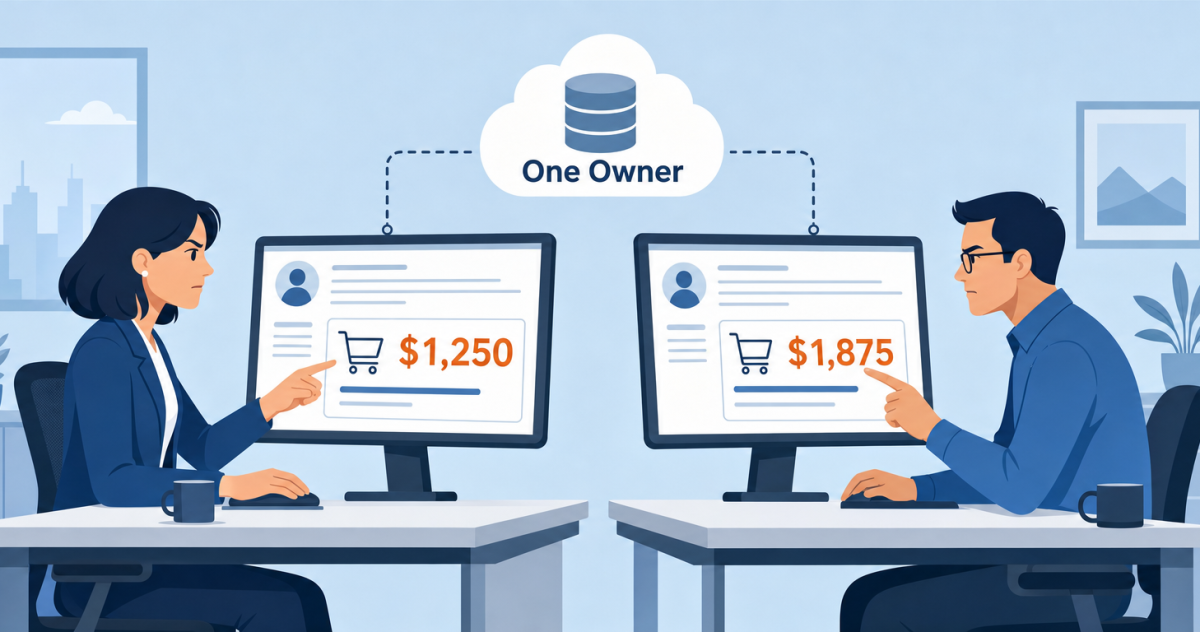
Your sales rep tells the customer the order comes to $18,400. Three days later the invoice lands at $18,760, because freight was added when the goods shipped and nobody told Salesforce. The customer disputes the invoice, collections stalls, and a deal that closed cleanly now sits in a queue while two teams argue about $360.
That is what the gap between a CRM and an ERP actually costs. It costs you a wrong number in front of a customer, a payment that arrives late, and a forecast that no longer matches the ledger.
Here is the thing most guides skip. It is tempting to fix this by syncing everything in both directions, so the two systems always agree. That instinct is the most common reason these projects go badly, because a field both systems can write is a field neither of them owns. Aonflow is a low-code integration platform with dedicated connectors for both Salesforce and Microsoft Dynamics 365 Business Central, and this post covers the part no platform decides for you: who owns what, and what happens at the seams.
This one is for whoever gets blamed for the number. Sales operations leads, finance and operations managers, controllers, and hands-on founders will get the most from it. None of it needs code, and the thinking holds whichever integration platform you use.
What this post resolves:
- Record ownership, meaning which system is right when the two disagree.
- Customer matching, meaning how a Salesforce account finds its Business Central customer.
- The handoff point, meaning when a won deal becomes a real order.
- The finance writeback, meaning what comes back to sales and in what form.
- Period cutoff, meaning which accounting month a late record lands in.
- How the connection itself is protected and who owns it when it breaks, as escalation triggers you can copy into a runbook.
Why Sales and Finance Disagree About the Same Customer
Both systems describe the same company, and both are correct on their own terms. Salesforce holds the relationship: the account, the contacts, the pipeline, and what the customer said they would buy. Business Central holds the obligation: the customer number, the credit limit, the payment terms, what shipped, what was invoiced, and what is still owed. Different jobs, so the two drift apart naturally rather than through anyone’s mistake.
The drift shows up in small, expensive ways. Sales updates a billing address in Salesforce, and the invoice still goes to the old one. A rep discounts to a price finance never approved. An account marked “customer” in Salesforce is blocked for shipping in Business Central, and the rep finds out after promising a delivery date.
Before you fix any of that, name the flows, because a flow with no stated job ends up carrying three. The account flow establishes identity. The order flow instructs, and it should refuse when the answer is no. The invoice flow closes revenue. The payment flow reports. Only the first keeps two records aligned. The other three carry a fact from the system that owns it to the system that needs it.
Record Ownership: Deciding Who Wins
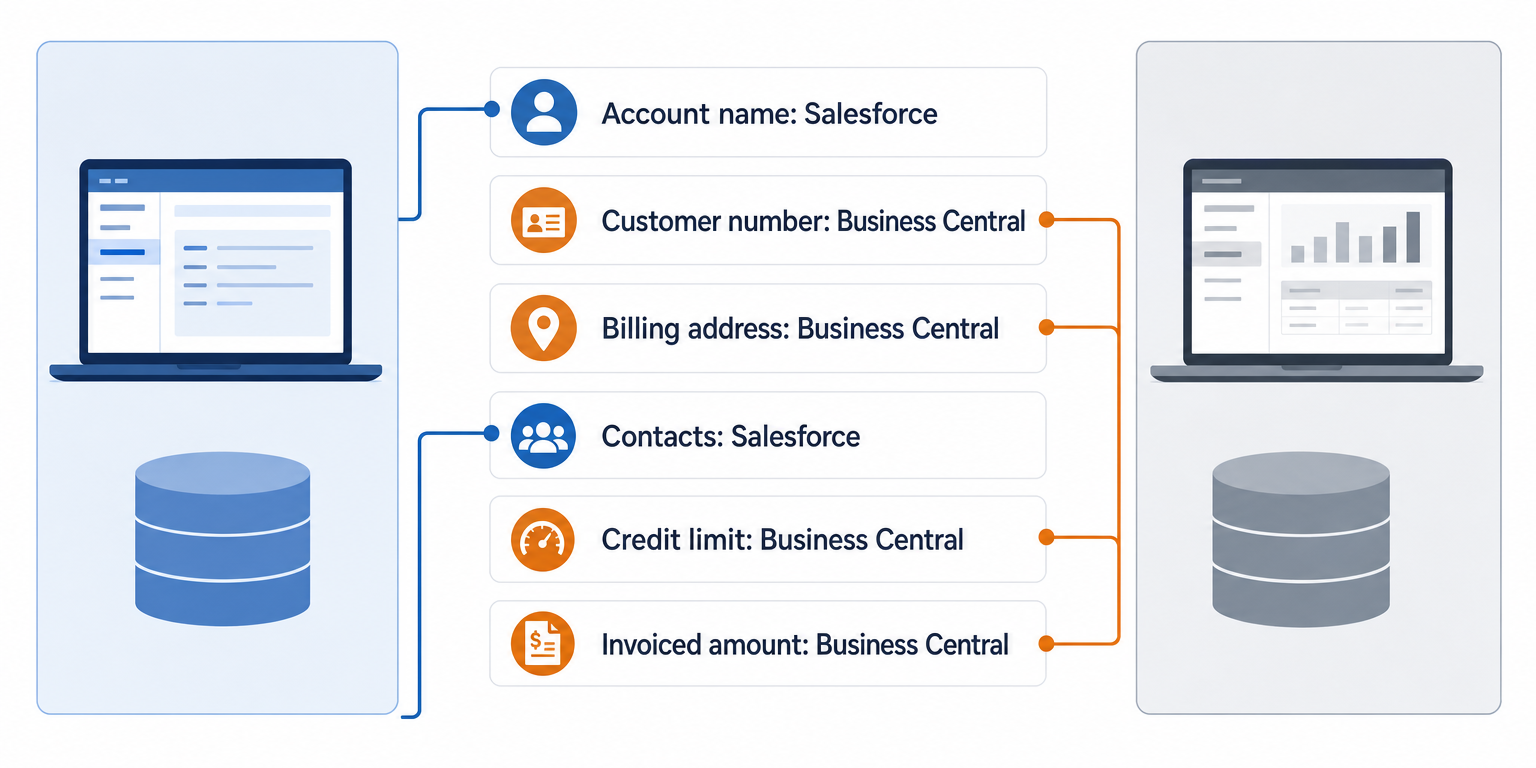
Before you configure a connector, write down which system owns each field. One owner per field, and the other side reads it. This is not a technical exercise, and it does not need a developer in the room. It needs the two people who will argue about the number later. Two-way sync on a field neither side owns produces a loop: Salesforce overwrites Business Central at 09:00, Business Central overwrites Salesforce at 09:05, and by Friday nobody trusts either screen.
The Rule: every field has exactly one owner, and two-way sync is what you build when you have not decided who it is.
A reasonable starting map looks like this. Adjust it to your business, but adjust it deliberately.
| Field | Owner | What happens if you get it wrong |
|---|---|---|
| Account or customer name | Salesforce | Invoices carry a name the customer does not recognise |
| Customer number | Business Central | Payments cannot be applied to the right ledger account |
| Billing address and payment terms | Business Central | Invoices go to the wrong place on the wrong terms |
| Contacts and relationship history | Salesforce | Finance emails a contact who left last year |
| Credit limit and blocked status | Business Central | Sales promises delivery to an account that cannot ship |
| Order total and invoiced amount | Business Central | Sales quotes one number and finance bills another |
There is a running cost to over-syncing as well. Salesforce meters API calls over a rolling 24-hour period, and an Enterprise Edition org gets 100,000 calls plus 1,000 per Salesforce license, so an org with 15 licenses gets 115,000 calls a day (Salesforce API request limits and allocations). A tidy one-way design uses a fraction of what a chatty two-way design burns through.
Customer Matching: How the Two Systems Find Each Other
Every other flow depends on this one working. Given a Salesforce account, which Business Central customer is it?
Matching on name does not work. “Acme Ltd”, “Acme Limited” and “ACME LTD.” are three strings and one company. So pick a stable identifier, store it on both sides, and match on that. The Business Central customer number is the usual choice, written back into a dedicated field on the Salesforce account so a human can see the link too.
Salesforce supports this through upsert on an external ID field. An identifier that matches nothing creates a record, unless you add the updateOnly parameter to prevent it. An identifier that matches more than one record returns a 300 error, and nothing is created or updated (Salesforce REST API upsert documentation). Treat that error as the design working, because a duplicate should stop the flow rather than let it guess.
Do the match by hand first. Export 50 real Salesforce accounts and find their Business Central customers yourself. Your manual match rate is the ceiling for anything you automate, and the accounts you cannot match are the ones that will fail in production.
The Handoff Point: When a Deal Becomes an Order
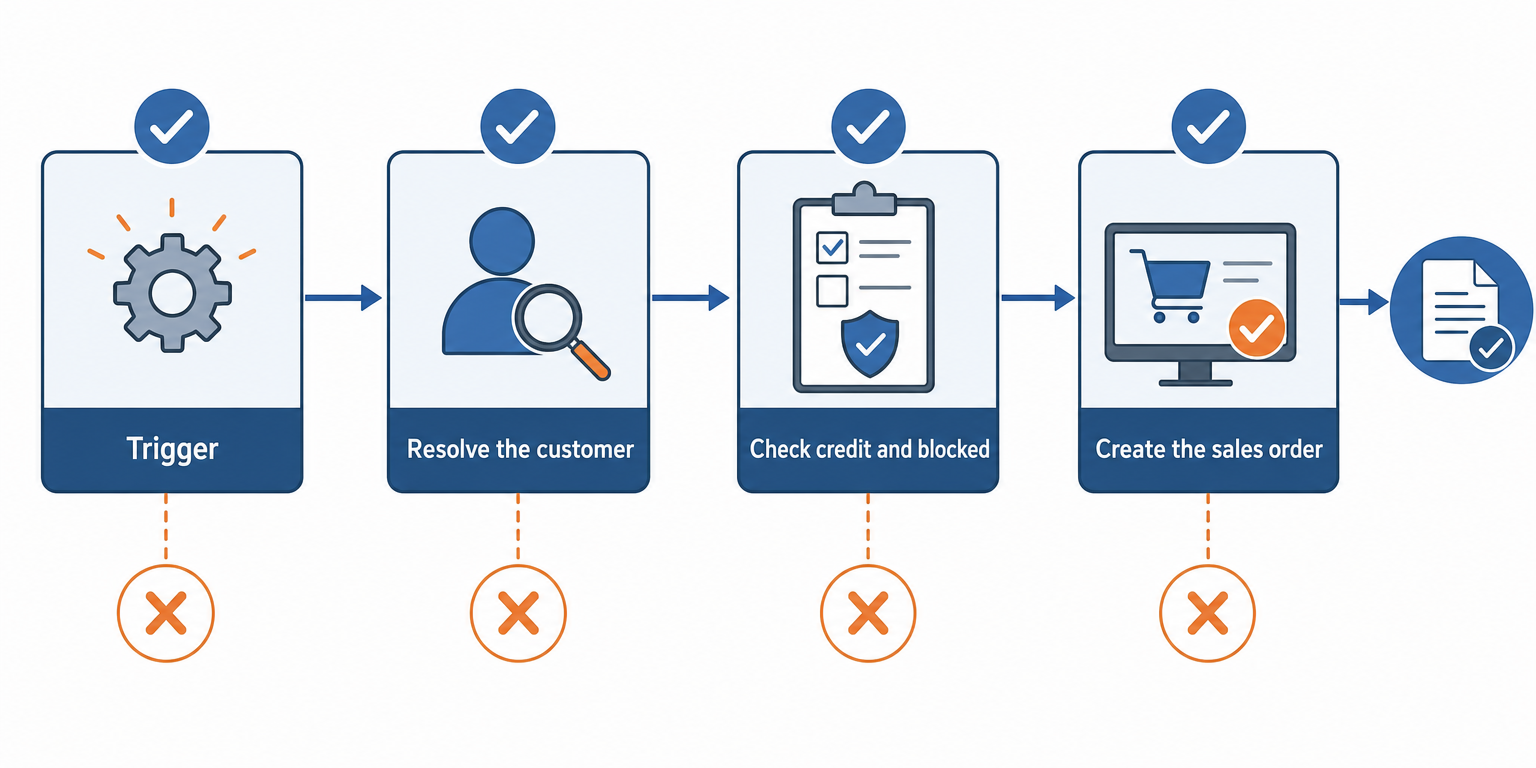
A closed opportunity is a sales fact. A sales order is a financial commitment. The boundary between them is where this integration earns its keep, and where most designs stay vague.
Sequence the handoff in four steps:
- Trigger. The opportunity reaches Closed Won, or clears an approval step first if discounts or non-standard terms are involved.
- Resolve the customer. Look up the Business Central customer by identifier. No match, no order, and the record waits for review.
- Check credit and blocked status. Business Central owns this answer, so ask it before promising anything.
- Create the sales order. Write the header and lines, then write the order number back to Salesforce.
Step 3 is the one teams skip. Business Central blocks customers on purpose, and the Blocked field on the customer card offers Ship, Invoice, and All. Ship prevents new orders and shipments, while existing shipments can still be invoiced. Invoice also prevents new invoices, and existing shipments cannot be invoiced either. All allows no transaction at all, including payments (Microsoft Learn: Block customers in Business Central). Near real-time sync is what makes that answer useful, because the rep sees it while still on the call.
The Finance Writeback: What Sales Gets Back
The return direction is narrower than most teams plan for, and more useful. Sales does not need the ledger. Sales needs three answers: was it invoiced, was it paid, and is this customer in good standing. Send those back as read-only fields, because a finance figure a rep can edit in Salesforce is a figure you will reconcile by hand later.
Keep the writeback to what changes a sales decision:
- Invoice number and invoiced amount, so a billing question gets answered without opening Business Central.
- Payment status and open balance, so nobody chases a renewal from an account that is 60 days overdue.
- Blocked status, so the credit answer is visible before the next deal starts.
Period Cutoff: Which Month a Late Record Lands In
Through most of the month, sync delay is a performance question. At the cutoff it becomes an accounting question, and it needs an answer agreed in advance.
Business Central enforces the boundary itself. You set Allow Posting From and Allow Posting To on the General Ledger Setup page, and those dates apply to the company and all users. Individual users can be given a different window on the User Setup page, which overrules the company setting, and Business Central checks User Setup first (Microsoft Learn: Specify posting periods in Business Central). A flow posting outside that window gets refused, exactly as a person would be.
Three decisions to settle before go-live:
- Which date governs the period. The Salesforce order date or the Business Central posting date. Map it explicitly, because a default is a decision nobody made.
- What happens when the window is closed. The record waits somewhere a person can see it, and the rejection reaches that person rather than a log file.
- The catch-up rule after an outage. Decide now whether a backlog posts to its original dates or the current period, and name who approves an exception.
A Worked Example: One Order, Two Numbers
A 90-person distributor runs pipeline in Salesforce and its books in Business Central. On 29 September a rep closes an opportunity worth $18,400, which is 40 units at $460.
Three things then happen that the design has to survive. First, the account already carries an open balance of $6,400 against a credit limit of $20,000, so the order takes the exposure to $24,800 and Business Central blocks it. Second, once credit clears and the goods ship, freight of $360 is added, so the posted invoice reads $18,760 rather than $18,400. Third, the shipment posts on 1 October, so revenue lands in October while the September forecast still counts it.
None of those is a bug. Each is an ownership question with a right answer. Business Central owns the credit decision, so the rep sees the block before promising a date. Business Central owns the invoiced amount, so $18,760 flows back as a read-only figure and the rep answers the customer correctly. The posting date rule, agreed in advance, puts revenue with the shipment rather than the close date. Write those three answers down and the same order goes through without a single email.
How Aonflow Connects Salesforce and Business Central
Every decision above is yours. This is where the platform does the work.
- Pre-built connectors for Salesforce and Business Central run the account, order, invoice and payment flows directly, with no middleware project in between.
- AI-assisted field mapping speeds up the ownership-mapping work covered above, so the decisions you made get built faster instead of typed field by field.
- Near real-time data sync makes the credit and blocked check at step 3 useful during a call rather than after it.
- Monitoring, logs and alerts are where a duplicate identifier or a refused posting becomes visible, instead of a record quietly not existing.
- Self-healing flows detect and recover flows that are breaking, which shortens the outage behind the catch-up rule.
Aonflow does not replace Salesforce or Business Central. It moves the traffic between them and holds the ownership rules you wrote down.
Security, Monitoring, and Governance
This connection carries customer, credit and revenue data across two systems of record, so it is worth being precise about what protects it. Aonflow provides encryption, role-based access control, and audit trails, so you can see who changed a flow and what it did. Data in transit moves over HTTPS, and HTTP access is available through read-only tokens where a flow only needs to read. For security detail beyond this posture, ask the Aonflow team.
Who Owns This When It Breaks
Who owns the flow? A named person, not a team alias. The owner usually sits in revenue operations or finance operations, because that is where a wrong number surfaces first. IT owns the credentials and the connection.
Who gets alerted when it fails? The owner, directly, with a named backup if the alert goes unacknowledged. An alert to a shared inbox is an alert to nobody.
Where do failed records wait for review? In a holding queue a person can open, decided before go-live. A sheet the flow writes to works well, and Aonflow connects to Google Sheets. Someone has to see the record, understand why it stopped, and release it.
Escalation triggers, in a form you can copy into a runbook:
| Trigger | Who acts | Within |
|---|---|---|
| An order rejected because the customer is blocked or over limit | Flow owner and credit controller | Same business day |
| A duplicate customer identifier stops an update | Flow owner | Same business day |
| A posting refused because the period is closed | Flow owner and close owner | Before the next close task |
| No orders delivered for a full scheduled cycle | Flow owner, then IT | 4 hours |
FAQ
Do we need to migrate historical Salesforce opportunities into Business Central?
Usually not. Start at a go-live date and carry across only what is still open, meaning unfulfilled orders and unpaid invoices. Historical pipeline is a reporting question, and migrating it multiplies your matching problem for no operational gain.
Does near real-time mean instant?
No, and the difference matters at month end. Near real-time means seconds or minutes rather than overnight, which is fast enough for a credit check during a call. At close, what matters is knowing what has not arrived yet.
Does an integration platform replace our Business Central partner?
No. It moves and transforms data between systems. It does not configure your posting groups, number series, or chart of accounts, and those decisions still belong to whoever set up your books.
Can we do this without a developer?
Yes for the build, with one caveat. Aonflow is a no-code platform and the flows need no code, but somebody has to know how your Business Central customers are numbered and how your Salesforce accounts are structured. That knowledge is the hard part, not the tooling.
Conclusion
Six decisions make this integration work: record ownership, customer matching, the handoff point, the finance writeback, period cutoff, and how the connection is secured and owned when it breaks. Every one is a business decision rather than a technical one, and every one is cheaper to make before the first sync than after it.
Before you build anything, export your ugliest 50 accounts, match them by hand, and see what survives.
Get Started with Aonflow iPaaS – Free Trial Available!
Build and deploy your integrations at zero cost. No credit card required!