

A rep moves a deal to Closed Won on a Thursday afternoon. The forecast updates and the commission accrual starts. On Monday the customer asks when the kit ships, and nobody in operations has heard of them.
That gap costs money in three ways. Fulfilment starts days late, so the go-live date slips before anyone touches a box. The invoice goes out from re-typed numbers, so it disagrees with what the customer signed. And at month end a controller finds deals in the pipeline report with no matching order in the ledger.
The uncomfortable part is that nothing was broken. Both systems worked. The CRM recorded a win and the ERP recorded nothing, because a win is not an instruction. Closing that gap is what Aonflow does. It connects the system where the deal was won to the system that has to deliver it, and moves the order across in near real-time with nobody re-keying a line.
This post runs technical in places, so here is who it is for: sales ops leads, finance and ops managers, controllers, and hands-on founders doing the re-keying today. The sequence holds whichever integration platform you use.
What this post resolves, in the order you have to decide it:
- The trigger decision: which moment creates the order, and why Closed Won is usually the wrong one.
- Product mapping: why customer matching is the easy half and line items are where these projects fail.
- Pricing authority: whose price the order carries when the two systems disagree.
- What the ERP is allowed to refuse: the checks that run before submission.
- The writeback: what returns to the deal, so nobody asks operations for a status.
- Booking period: which month a deal that closes on the 31st belongs to.
The Trigger Decision: Closed Won, or Order-Ready?
It is tempting to wire the flow to Closed Won. It is the obvious event, and in Salesforce it is a stage value with a read-only won flag derived from it (Opportunity object reference).
But reps move deals to Closed Won when the customer says yes on a call. That is often before the signed order form arrives. It is usually before the ship-to address is known, and before anyone agrees a delivery date. Fire the order then and you create an obligation from an incomplete record.
The Rule: Closed Won is a sales milestone, not a fulfilment instruction.
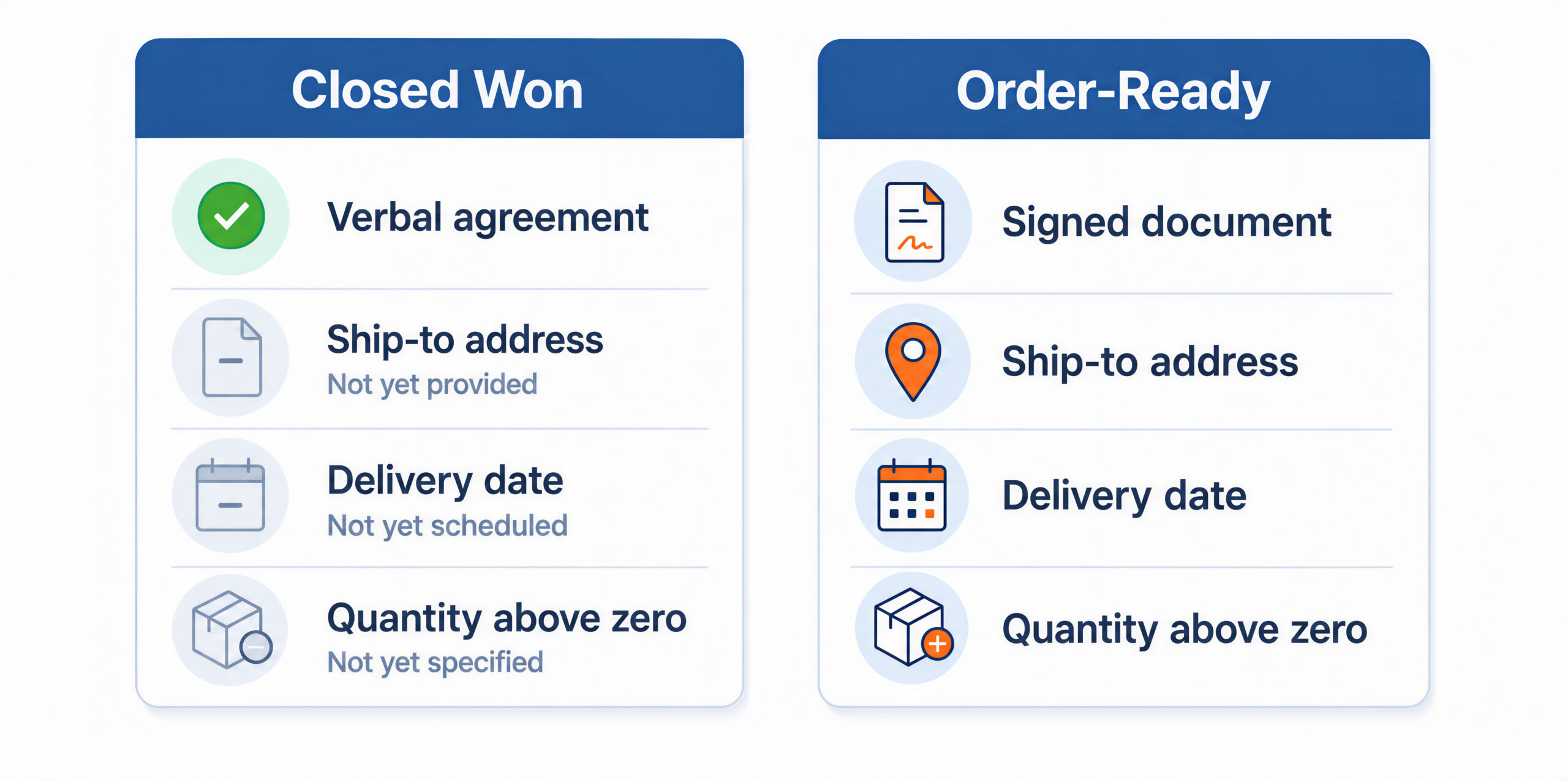
So define an order-ready condition, short enough to check: the stage is won, a signed document is attached, every line has a quantity above zero, the ship-to address is populated, and a delivery date exists. Closed Won can still start the check. It just does not create the order.
Write this one down first. It sets how much validation you need later, and it is the only decision here you cannot retrofit cheaply.
Product Mapping: Where Won Deals Actually Fail
Customer matching is the half everyone worries about, and it is the easier half. It is one record, matched on one or two fields, and if no match exists you create it. Match on something durable, such as a tax registration number or an ERP customer number, never on company name. “Acme Ltd” against “Acme Limited” does not survive a rename.
Products are the hard part. The CRM holds a commercial catalogue built to be sellable. The ERP holds an item master built to be fulfillable and postable. They rarely line up one to one.
| What sales sells | What the ERP needs | The decision |
|---|---|---|
| A bundle sold as one line | Several separate items | Which items, in what quantities, and which one carries the discount |
| A service with no stock | A non-inventory or service item, with its own code | Which ERP item code the service maps to |
| A subscription with a term | An item plus a start date and a term | Whether the term becomes lines, a date range, or a billing schedule |
| A free-of-charge item | An item at zero price, or a discount line | Whether zero-priced lines may post at all |
On a NetSuite sales order, each line is filled by selecting an existing item record, and every sales transaction needs at least one line (Adding Items on a Sales Transaction). A product code with no matching item therefore cannot go on the order at all. So an unmapped code is not a warning. It is a stop.
Get the answers for your top 20 products in writing from whoever owns the item master, before you design anything. That conversation is the project.
Pricing Authority: Which System Wins
Both systems can price an order, so both can produce a different total for the same deal. Pick one as authoritative and hold it everywhere.
- The deal price wins. The order carries what the customer was told, and the ERP accepts it as an override. Best where the negotiated price is the commitment.
- The ERP price wins. The order is recalculated from the ERP price list and contract terms, and a difference is flagged. Best where finance owns pricing.
There is no third option where both win. What you also need is a tolerance: a difference the flow may pass silently, and a difference above which the order is held for a human. Set it in currency, not as a percentage. A small percentage of a large order is not a small problem.
Hand-typed discounts get their own decision. A discount typed into a CRM field is a number with no rule behind it. So either map it to an ERP discount item that posts to the right account, or reject it in favour of the ERP’s own tiers.
What the ERP Is Allowed to Refuse
It is tempting to configure the flow so that nothing ever fails, because a failure looks like a defect. A refused order is not a defect. It is the ERP protecting your books, and it is the most useful signal in this pipeline, provided somebody sees it.
Run the checks yourself, before submitting. Your own check produces a held record with a plain-English reason, while the ERP’s produces a refusal in a log.
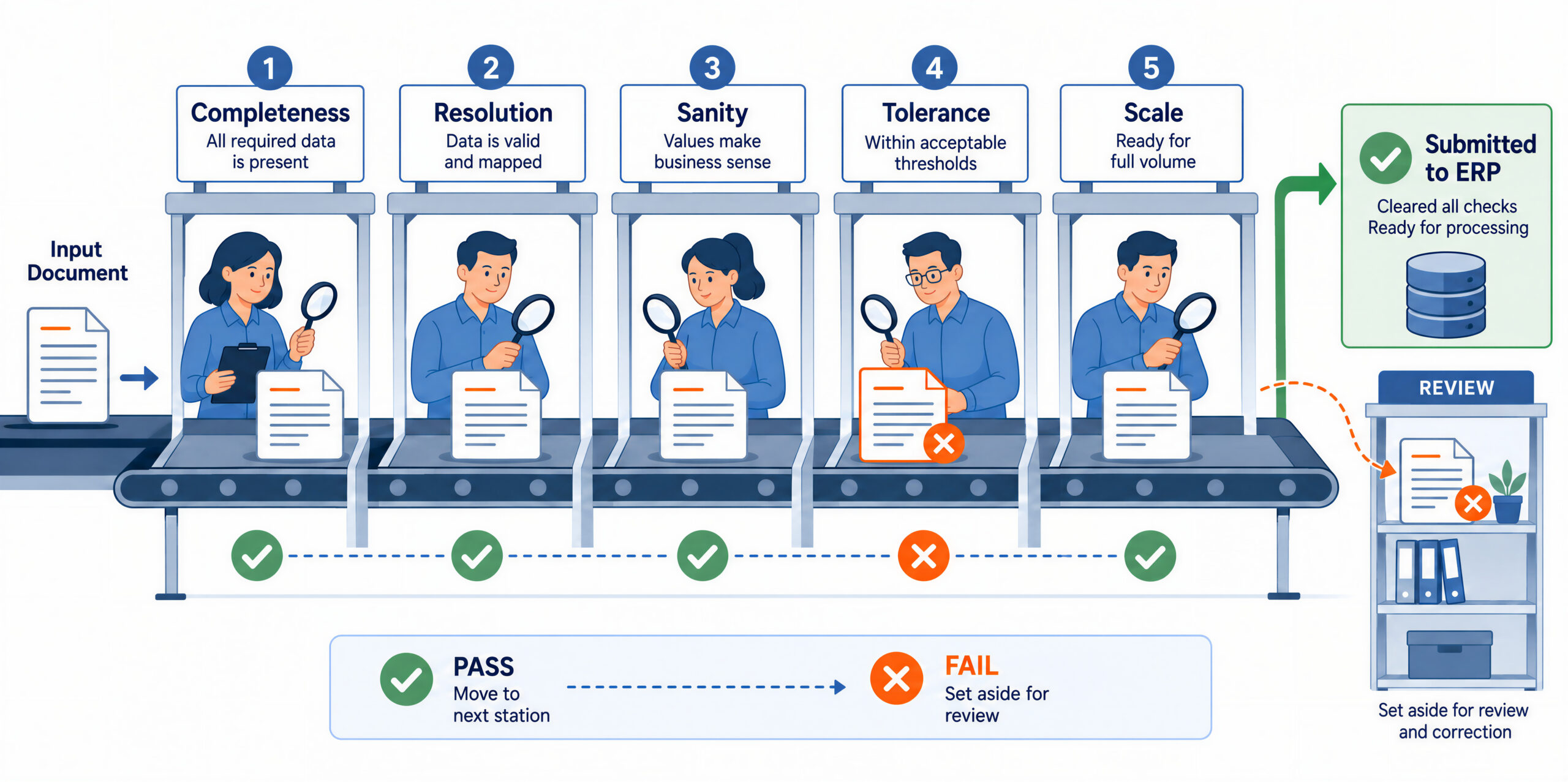
- Completeness. Every field the ERP requires is present. A NetSuite sales order needs a customer, a date, a status, and at least one item (Creating Sales Orders).
- Resolution. Every line’s product resolves to a real ERP item code, and the customer to a real ERP customer.
- Sanity. No zero or negative quantities, no empty price, no duplicate of an order already created from this deal.
- Tolerance. The recalculated total sits within the agreed difference from the deal total.
- Scale. The line count is within the ERP’s limit. NetSuite caps a sales order imported over SOAP web services at 1,000 lines, and warns that any transaction above 1,000 lines can hurt performance or time out (Limitations for Importing Transactions).
Test each pass with your ugliest real deal, not a clean sample opportunity. Clean data passes everything and proves nothing.
The Writeback: What Sales Sees After the Order Exists
The order flow instructs. The writeback flow reports. Keeping the two jobs separate is what keeps the design simple.
Write back three things and resist adding more: the ERP order number, the order status, and the expected ship date. That is enough for a rep to answer a customer without opening the ERP. It is also enough for a dashboard to show which won deals have no order yet.
NetSuite makes the link easy in the other direction too. With the Opportunities feature enabled, the sales order header carries an Opportunity field (Creating Sales Orders). Finance can then trace an order back to its deal without asking sales.
Do not write back the invoice. An invoice is a finance document with its own approval path, and copying it into the CRM creates a second version of a number finance owns.
Booking Period: The Deal That Closes on the 31st
Sales counts a deal on its close date, because that is what the commission plan uses. Finance cannot, because the order is not the accounting event. In NetSuite, sales orders do not affect the general ledger; the invoice does (Creating Sales Orders).
So a deal won at 6pm on the 31st can be a March win and an April invoice. Two dates then need deciding explicitly.
- The order date. Set it from the deal’s close date, not from the time the flow ran. A run at 00:20 should not push the deal into the next month. Then set a backdating limit: how many days back the flow may date an order without human approval.
- The catch-up rule. If the flow is down over the cutoff, decide in advance whether released orders carry their original close date or the release date. Write it down, or the person doing catch-up at 8am on the 1st decides it themselves, differently each time.
One rule follows. A held order still held at cutoff is a finance issue, not a queue item, so it escalates to the finance lead.
A Worked Example: A Won Deal the ERP Refused
Sales runs in Salesforce, finance in NetSuite. A rep wins a renewal and expansion deal and marks it Closed Won at $48,168.
The deal has two lines. First, 120 licences at $340 each is $40,800, less a 4% discount the rep typed in, so $39,168. Second, a standard implementation service at $9,000.
Pricing authority was never decided. The ERP price list holds the licence at $355, plus a 3% contract tier for this customer. Recalculated, the licence line is $41,322 and the total is $50,322. That is $2,154 above what the customer was told. With the deal price authoritative, the order goes out at $48,168 and the difference is flagged. With the ERP price authoritative, somebody has to call the customer. Either is defensible. Undecided is not.
Product mapping was never done. The implementation line carries the code IMPL-STD, which does not exist in the ERP item master. Services are set up there as non-inventory items under a different code, so the order is refused on that one line.
With the five passes running, this deal never reaches the ERP. It stops at the resolution pass with one sentence: the item IMPL-STD has no ERP item. That is a five-minute fix in the mapping. Without them, it is a refusal in a log, a CRM that still says Closed Won, and no order for a week.
How Aonflow Turns Won Deals Into ERP Sales Orders
Aonflow lets teams:
- Build the deal-to-order flow with no code, using the confirmed Salesforce and NetSuite connectors, or describe it in plain language with LLM-based flow building. The trigger decision becomes a configuration, not a development ticket.
- Map deal line items to ERP items with AI-assisted mapping, which is the step that resolves the IMPL-STD problem, and reduces integration time by more than half.
- Run the five validation passes as flow steps, so the missing item code and the $2,154 tolerance breach become held records with reasons.
- Sync in near real-time, so the order date follows the close date rather than the queue. That is what makes the backdating limit meaningful.
- Write the order number, status, and expected ship date back to the deal, keeping the reporting flow separate from the instructing flow.
- Monitor with dashboards, logs, and alerts, and recover interrupted runs with self-healing flows. That is what makes the catch-up rule enforceable after an outage over cutoff.
Aonflow orchestrates the handoff. It does not replace the CRM or the ERP, and it does not price your products for you.
Who Owns This When It Breaks
Who owns the flow? One named owner in sales operations or business systems, accountable end to end. This flow fails between two systems, so splitting ownership between the CRM admin and the ERP admin means nobody checks.
Who gets alerted when it fails? The flow owner on the first held order, and on two consecutive run failures. The finance lead when a held order crosses period cutoff, because that one changes the books. The IT head on a connection or credential failure, because that one stops everything.
Where do failed records wait for review? In a held-orders queue that a named person clears daily. It shows the deal reference, the failed validation pass, and the exact field at fault. Not a log file, and not an inbox.
| Escalation trigger | Who acts |
|---|---|
| An order-ready deal has no ERP order after 4 hours | Flow owner |
| Resolution pass fails on a product code | Flow owner, then the product catalogue owner |
| Tolerance pass fails above the agreed currency threshold | Sales ops, with finance |
| A held order is still held at period cutoff | Finance lead |
| A connection or credential fails | IT head |
Role-based access control, audit trails, and alerts on flow execution support this. Data moves over HTTPS, and read-only tokens are available where a flow only needs to read.
FAQs
Does an integration platform replace our CRM or our ERP?
No. The CRM stays the system of record for the deal, and the ERP for the order and the books. The platform owns the handoff between them.
Should the order be created at Closed Won or at signature?
At whichever moment your business treats as committed. If a signed order form arrives after the stage change, that is your trigger.
If validation holds an order, does sales have to re-enter the deal?
No. The held record keeps the deal reference, so the same record is released once the problem is fixed.
Can the same flow handle an upsell to an existing order?
Treat that as a separate decision. Amending a partly fulfilled order behaves differently from creating one, so most teams create a new order and link it.
Do we need a developer for this?
No code is required to build the flow. You do need somebody who knows how your item master and price list are set up, because product mapping and pricing authority are business decisions.
Conclusion
Six decisions turn won deals into ERP sales orders reliably: the trigger decision, product mapping, pricing authority, what the ERP is allowed to refuse, the writeback, and booking period. Settle them once and the handoff stops being somebody’s morning routine.
Before you build anything, export your last 200 won deals and try to map every line item to an ERP item code by hand. The share that fails is your real project scope.
Get Started with Aonflow iPaaS – Free Trial Available!
Build and deploy your integrations at zero cost. No credit card required!