

On Friday at 5:40 pm, a rep drags an opportunity to Closed Won. The room reacts. The number goes on the board. And then, for two working days, nothing happens.
That gap has a price. The customer waits for a delivery date nobody has committed to. The invoice, when it goes out, shows a total the customer does not recognize, because someone re-typed a discount from memory. At month end, finance reconciles a pipeline report against a ledger that disagrees with it. Most teams read this as a discipline problem and answer it with a reminder. It is not. The two systems genuinely disagree about what a won deal is, and care does not fix a disagreement.
Aonflow has pre-built connectors for both Salesforce and Business Central, so the path from a closed-won opportunity to a live sales order becomes a configured flow with named rules, running in near real-time.
This gets specific about fields and posting rules, so it helps to say who it is for: whoever owns the close. Finance and operations leads, controllers, and hands-on founders. The five decisions below hold whichever integration platform you use.
Before you connect anything, resolve these five decisions:
- Trigger point: what counts as “ready for finance”, because Closed Won on its own usually is not it.
- Line item mapping: how a product on an opportunity becomes a line on a sales order when the catalogues do not match.
- Discount and tax precedence: which system owns the price once the deal is closed.
- Period cutoff: which accounting period a late order lands in, and the catch-up rule after an outage.
- Failure handling: where a rejected order waits, and who works it.
What the Handoff Actually Costs You
Nobody’s job title is “re-keys deals into the ERP.” The work happens in the gaps: a sales ops coordinator on Monday morning, a finance analyst checking a shared inbox, a founder who does it personally because nobody else can be trusted with pricing.
The cost lands in three places. First, cycle time, because the order does not exist until a human creates it, so fulfilment cannot start. Second, accuracy, because every re-key can drop a line, round a price, or miss a discount. Third, and most expensively, trust: once the sales report and the ledger have disagreed twice, leadership believes neither.
Trigger Point: What Counts as “Ready for Finance”
Closed Won is a sales stage, not a fulfilment instruction. On many teams it means “verbally agreed, paperwork coming”, which is the wrong moment to create a binding order. So choose the trigger explicitly, in rising order of strictness:
| Trigger | What it buys you | What it costs |
|---|---|---|
| Stage reaches Closed Won | Fastest path to a live order | Some orders get cancelled the next day |
| Closed Won plus a signed document on file | Removes the most common cancellation cause | A few hours of cycle time |
| Closed Won plus a customer PO number | Invoices your customer’s system will accept | A dependency on the customer |
The Rule: Closed Won tells you a deal exists. It doesn’t tell you it’s ready to bill.
Whichever you pick, the trigger must be a field the flow can read, not a judgment someone makes. A checkbox, a stage value, or a populated PO field qualifies. “The rep knows it is real” does not, and a field a rep can leave blank fires inconsistently.
Get this answer from finance in writing before you design anything. It takes one meeting, and it is the decision most often revisited after go-live.
Line Item Mapping: Opportunity Products Become Sales Order Lines
This is the decision that takes longest and pays back most.
In Salesforce, products reach an opportunity through a price book. Any product with an active price book entry can be added, the total price on a line is the quantity multiplied by the sales price, and the opportunity amount is the sum of the products on it (Salesforce Help). In Business Central, each sales order line carries a Type and a No. resolving to an item or service, a Quantity, a Unit Price and a Line Discount %, and the Line Amount is unit price multiplied by quantity (Microsoft Learn).
Those two catalogues are rarely the same catalogue. The CRM product list was built around how deals are sold; the ERP item list around what can be picked, shipped and costed. A bundle that is one line in the CRM is often three in the ERP.
Map the Catalogues Before You Map the Fields
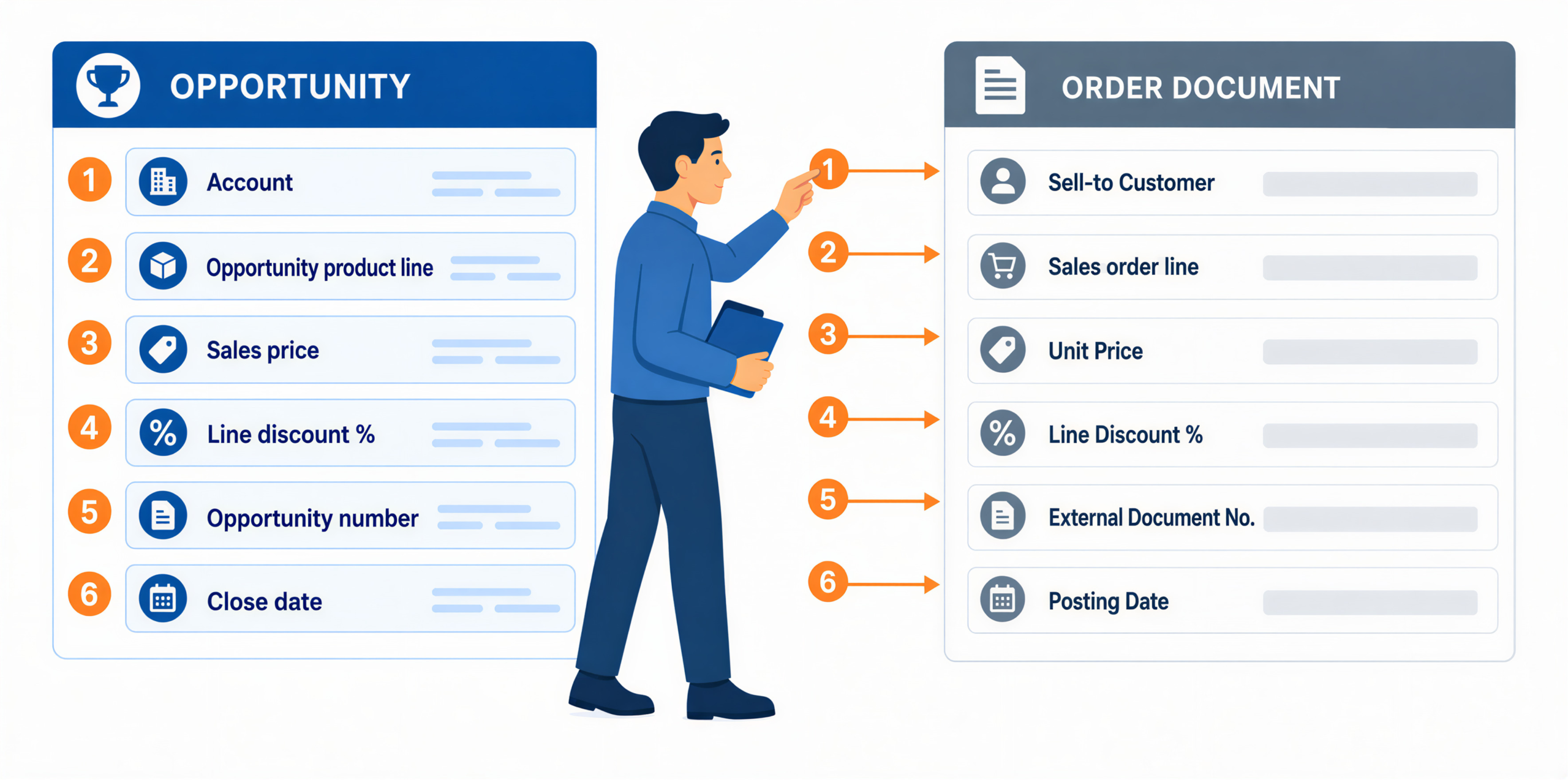
| What the opportunity holds | Where it lands on the sales order | The decision you have to make |
|---|---|---|
| Account | Sell-to Customer | Match on an identifier, never on company name |
| Opportunity product line | Sales order line | Does the CRM catalogue carry the ERP item code? |
| Sales price on the line | Unit Price | Which system owns price after close? |
| Line discount | Line Discount % | May the ERP add its own discount on top? |
| Opportunity number | External Document No. | Is it mandatory in your setup? |
| Close date | Posting Date | Which period does a late order belong to? |
The decision is not how to copy the lines. It is which catalogue is the authority and who maintains the crosswalk. That question generalizes well beyond line items, and our complete guide to Salesforce and Business Central integration works through record ownership across the whole relationship. Pick one, usually the ERP, and carry the ERP item code as a field on the CRM product record. The mapping then becomes a lookup rather than a guess.
Test this with your ugliest real records, not clean sample data. The bundled product, the one-off custom line, the deal with a negative line for a trade-in. Those break mappings, and they are already in your CRM.
Discount and Tax Precedence: Which System’s Price Wins
Both systems price the same deal, and they will not always agree.
The CRM carries the negotiated number. The ERP carries standing arrangements: customer price lists, line discounts, invoice discounts, and a Prices Including Tax setting on the customer card that determines whether line amounts already include tax (Microsoft Learn). Push a negotiated price into a system that then applies its own customer discount, and you have issued a second discount nobody approved.
It is natural to treat this as a data-formatting question that a mapping table solves. It is a question of authority.
The Rule: a closed-won opportunity records what was agreed, and a sales order instructs someone to deliver and bill it, so the handoff is a translation, not a copy.
Settle on one of two positions and build to it. Either the negotiated price is final, in which case the flow writes it as an explicit line discount and leaves the ERP’s pricing engine nothing to add, or the ERP is authoritative, in which case the CRM number is an estimate and any difference is a finance decision. Both work. Having neither is the failure.
Period Cutoff: Which Accounting Period a Late Order Lands In
Eleven months a year, a few hours of latency is invisible. In the last week of a period it decides which month your revenue sits in.
Take an opportunity marked Closed Won on 31 March at 6:40 pm, with the order created on 1 April. In Business Central, accounting periods do not control where that lands. Posting dates are governed by Allow Posting From and Allow Posting To on the General Ledger Setup and User Setup pages (Microsoft Learn). Once finance narrows that window to lock March, a late order posts to April whatever the CRM says.
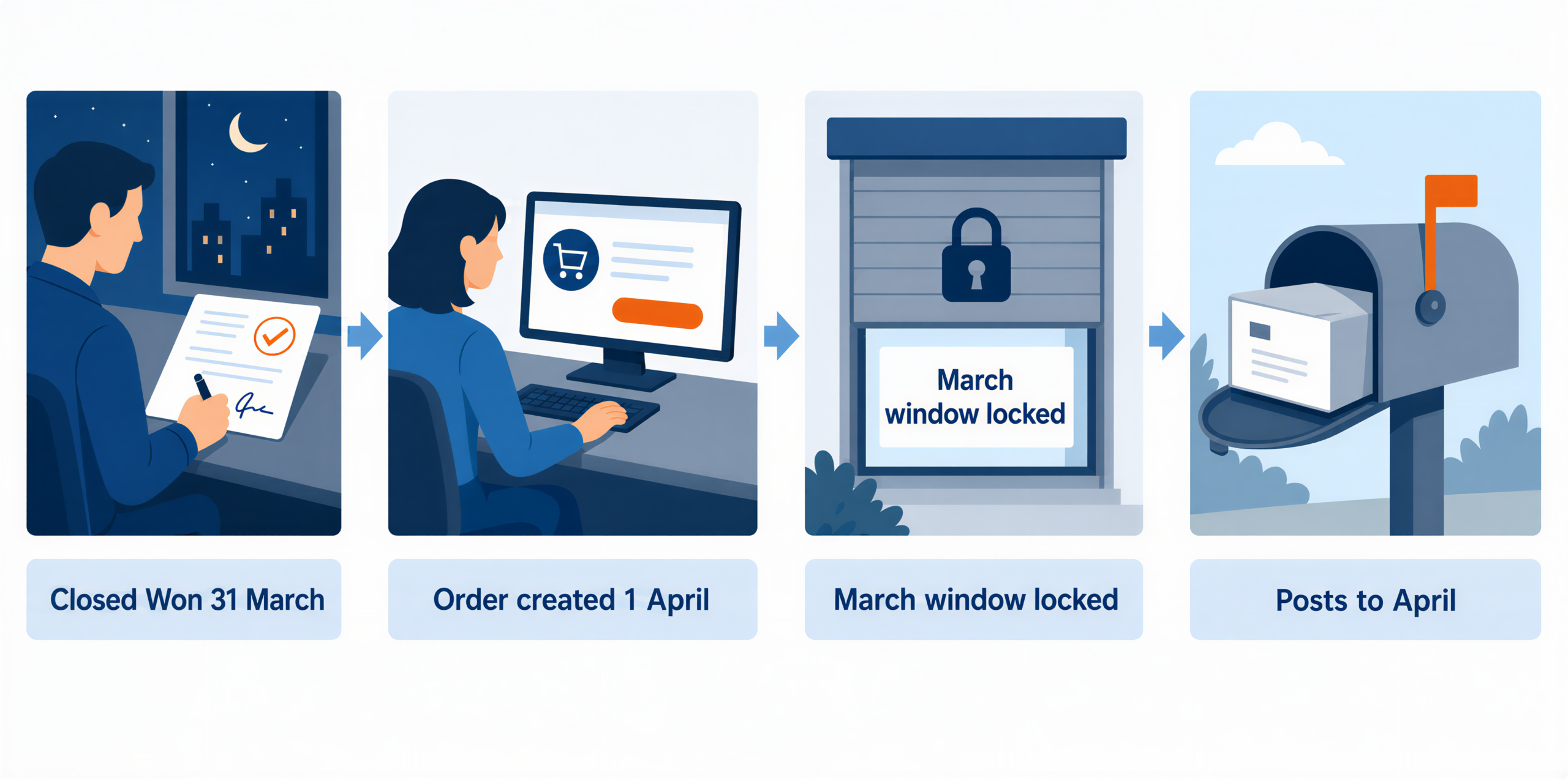
So the flow needs two rules, both agreed with finance:
- The normal rule. Carry the close date as the posting date while the posting window still allows it.
- The catch-up rule. After an outage across a cutoff, hold the affected orders with their original close dates and let finance decide each one, rather than posting them automatically into whichever period is open.
Teams skip the second rule, and it is the one that matters. A catch-up run that posts fifty orders into the wrong month during a close is worse than fifty orders waiting in a queue.
Failure Handling: Where a Rejected Order Waits
Design the failure path alongside the happy path. Rejections are the flow doing its job, and they cluster into four types with four different owners.
| Rejection | Owner | Typical fix |
|---|---|---|
| Unmatched item code | Sales ops | Add the ERP item code to the CRM product record |
| Customer not yet in the ERP | Finance | Create the customer card, then release the held order |
| Missing external document number | Sales ops | Chase the customer’s PO |
| Price outside the margin threshold | Finance lead | Approve, or correct and release |
That third row is a hard constraint rather than a preference: with Ext. Doc. No. Mandatory set, Business Central will not post an invoice without an external document number (Microsoft Learn).
Give all four the same destination, a visible exception queue where each record keeps its opportunity reference, its close date, and the reason it stopped. Silent retries are the anti-pattern: a flow that retries forever shows green on a dashboard while orders pile up behind it.
How Aonflow Runs This Flow
Aonflow lets teams:
- Trigger on the CRM condition you chose and run in near real-time through the pre-built Salesforce and Business Central connectors, so the order exists on Friday evening rather than Monday morning.
- Build the catalogue crosswalk with AI-assisted field mapping, the slowest part of this build and the reason setup time drops by more than half.
- Express the discount and tax precedence decision as flow steps, so the pricing authority you chose is enforced by the flow instead of remembered by a person, and the $1,458 problem below cannot recur quietly.
- Hold period cutoff exceptions rather than posting them, keeping the original close date on the held record.
- Monitor every run, alert on the failures above, and self-heal the transient ones, so a bad mapping raises a person while a dropped connection resolves itself.
A Worked Example: One Deal, Two Systems
A 40-person industrial supplier runs Salesforce for sales and Business Central for finance and fulfilment.
A rep closes a deal at $48,600 across three product lines, including a 12% line discount she negotiated and got approved. The flow creates the sales order. It comes out at $47,142.
The $1,458 gap is a 3% invoice discount sitting on that customer’s card in Business Central, agreed two years earlier by a finance manager who has since left. The ERP applied it on top of the rep’s discount, exactly as configured. Nothing failed, and no alert fired. The customer received an invoice $1,458 below the signed total, and the controller found it six weeks later.
The fix was a change to the flow, not a project, and it meant finally picking one of the two positions from the precedence decision: the negotiated price is final. It now writes the negotiated total as an explicit line discount, sets the invoice discount on the order to zero, and holds any order where the two calculations differ by more than $50. That is the precedence decision and the failure queue working together.
Who Owns This When It Breaks
Who owns the flow? Sales operations. Not IT, and not finance. Sales ops is the only function that sees both catalogues and has an incentive to keep the crosswalk current when the product list changes.
Who gets alerted when it fails? The sales ops owner on the first failure, by email and in the monitoring dashboard. The finance lead on any failure touching posting dates or pricing, because those are accounting decisions rather than integration ones. The IT head on a credential or connection failure that survives a self-healing retry.
Where do failed records wait for review? In a named exception queue, not a log file. Each held record keeps its opportunity reference, its close date, and the reason it stopped. Nothing is deleted, and nothing retries silently.
Escalation triggers:
| Trigger | Who acts | Within |
|---|---|---|
| An unmatched item code on a closed-won deal | Sales ops | Same business day |
| A posting date outside the allowed window | Finance lead | Before the close runs |
| Order total differs from the opportunity total by more than your threshold | Finance lead | Before posting |
| Connection or credential failure that survives a retry | IT head | 1 hour |
Role-based access control governs who can change the flow, audit trails record what changed, and data moves over HTTPS. Those are controls, and they only help once the three questions above have named people against them.
FAQs
Do I still need this if my CRM has a quoting module?
Usually yes. A quote records what you offered. A sales order instructs fulfilment and feeds the ledger. The handoff between them is what this flow removes.
Should the flow create a sales order or a quote first?
Create the order when your trigger is strict enough to justify it. If Closed Won is loose on your team, generating a quote gives finance a review step before anything binds.
What happens to deals cancelled after the order is created?
That is decided by the trigger. A loose trigger means you will cancel some, and reversing a posted document is a finance procedure rather than an integration one.
Can this run in both directions?
It can, but be careful what goes back. Writing a shipment status or an invoice number onto the opportunity is useful. Writing adjusted prices back into the CRM tends to create a loop, because the CRM then looks like it holds a new agreement.
Does this replace our ERP’s sales module?
No. Aonflow connects and orchestrates the systems you already run. The sales order still lives in the ERP and behaves exactly as finance configured it.
Conclusion
The five decisions are the work: trigger point, line item mapping, discount and tax precedence, period cutoff, and failure handling. The connection is the easy part, and the teams that struggle with this flow struggle because they built the connection first and answered the decisions afterwards.
Before you build anything, answer these five in writing:
- What field, exactly, marks a deal ready for finance?
- Which catalogue, CRM or ERP, is the authority for line items, and who maintains the crosswalk?
- Whose price wins once the deal is closed?
- What happens to a late order when the books are about to close?
- Where does a rejected order wait, and who is named against it?
Then take your ugliest real closed-won deal, the one with the odd discount and the bundled product, and walk it through all five by hand. What breaks on that deal is what will break in production.
Get Started with Aonflow iPaaS – Free Trial Available!
Build and deploy your integrations at zero cost. No credit card required!