

In May, a rep moves a promising deal into the Qualification stage, and the integration creates a customer in Business Central. In July, the deal is lost. In September, a second rep sends the same company a sample order. It flows straight through, because the account already has a customer number. The goods ship, the invoice posts, and nobody ever approved credit for a company that never bought anything.
What a Premature Record Really Is
That is what a premature customer record costs. It is not clutter. It is a door into your ledger that nobody decided to open. Business Central treats a blank credit limit as no credit limit at all (Microsoft Learn). So a card built from a template before finance looked at it is, in effect, an unlimited line of credit. Multiply that by every deal that reached a middle stage, and your customer list stops meaning “the companies we bill.”
The root cause is one word. Sales calls a deal qualified when the company is worth pursuing. Finance needs qualified to mean the company is ready to bill. Aonflow has pre-built connectors for Salesforce and Business Central, so qualification-gated customer creation runs as a configured flow, in near real-time, on the meaning finance needs. The decisions below hold on any integration platform. This is for whoever owns the customer list: controllers, finance and operations leads, and the IT head who connected the two systems.
Five decisions keep prospects out of your ERP:
- The gate conditions: the facts that must all be true before a customer card exists.
- The gate hold: where a won deal waits when one condition is still missing.
- The unwind rule: what happens to a card when its deal reopens or is lost.
- The premature-record cleanup: what to do with the cards already created too early.
- Period cutoff: which month a first invoice lands in when the gate opens late.
What Does a Premature Customer Record Cost?
A customer card with nothing posted looks harmless. It has a name, a number and an empty ledger. Even so, it does three kinds of damage.
First, it extends credit. The card came from a template, so it carries whatever the template carries. If the template leaves the credit limit blank, Business Central raises no credit-limit warning on any order for that company.
Second, it weakens every check that runs against the customer list. A duplicate check that searches 1,312 cards when only 826 are real customers finds more false matches. As a result, it holds more good records for review.
Third, it is hard to take back. Once anything posts against the card, Business Central won’t let you delete it, because the ledger entries might be needed for auditing (Microsoft Learn). A record created by mistake becomes a record you keep.
Two Meanings of “Qualified”

Most teams pick a creation trigger by asking sales when a deal becomes real. However, sales is answering a different question. In a sales process, qualification means the company has a need, a budget and a reason to keep talking. It says nothing about whether the company will ever receive an invoice.
The Rule: sales qualification says a company is worth pursuing; ERP qualification says it is ready to bill. Gate customer creation on the second, never the first.
In practice, Salesforce can hold every company you have ever spoken to. Business Central should hold the ones you bill. The customer flow’s job is to admit a company to the ledger, and admission needs a stricter test than interest.
The Gate Conditions: What Must Be True Before a Customer Exists
It is tempting to pick one stage and fire on it. But a stage is one field that a rep moves with a click, and it can move backward. A gate is a short checklist instead. The flow checks it every time the opportunity changes, and it creates the customer the first time every item is true.
| Gate condition | What the flow checks in Salesforce | Why finance needs it |
|---|---|---|
| The deal counts as won | The stage’s won flag, not its name | A company you might sell to is still a prospect |
| The first invoice amount is above zero | The opportunity amount | A free pilot has nothing to bill |
| The billing identity is complete | Legal name and bill-to address on the account | The invoice prints both |
| A credit decision is recorded | A credit limit or a prepayment flag, set by finance | A blank credit limit means no limit at all |
Read the won condition from the flag behind the stage. In Salesforce, each stage value carries a won flag, and more than one value can count as won (Salesforce Developers). So a gate keyed to the words “Closed Won” breaks the day someone adds “Closed Won: Renewal.”
The gate decides whether a company deserves a card. It does not decide whether the company already has one. That is the duplicate check, which runs after the gate opens and is covered in our guide to who creates the customer record, and when.
The Gate Hold: Where a Won Deal Waits
A deal that passes three conditions and fails one should not vanish into a log. The flow does three things instead:
- It adds the deal to the gate hold list, naming the missing condition.
- It alerts the condition’s owner: finance for a credit decision, or the rep for billing identity.
- It holds the order until the missing condition is resolved.
When the owner fixes the gap in Salesforce, that change re-runs the check. Nobody has to resubmit anything.
Tell people what is missing, not that something failed. “Waiting on credit decision” gets cleared the same day. “Integration error” gets a support ticket and sits for a week.
The Unwind Rule: When a Deal Reopens
Deals move backward. A customer asks to rescope, a contract stalls in legal, or a rep marks a deal won a day early to make the month. The instinct is to mirror that change and delete the Business Central card. Don’t.
The flow never deletes a customer. Instead, it sets the card’s Blocked field to Ship and alerts finance. Ship stops new orders and new shipments for that customer, yet it still allows existing shipments to be invoiced (Microsoft Learn). In other words, it closes the door without trapping anything already inside.
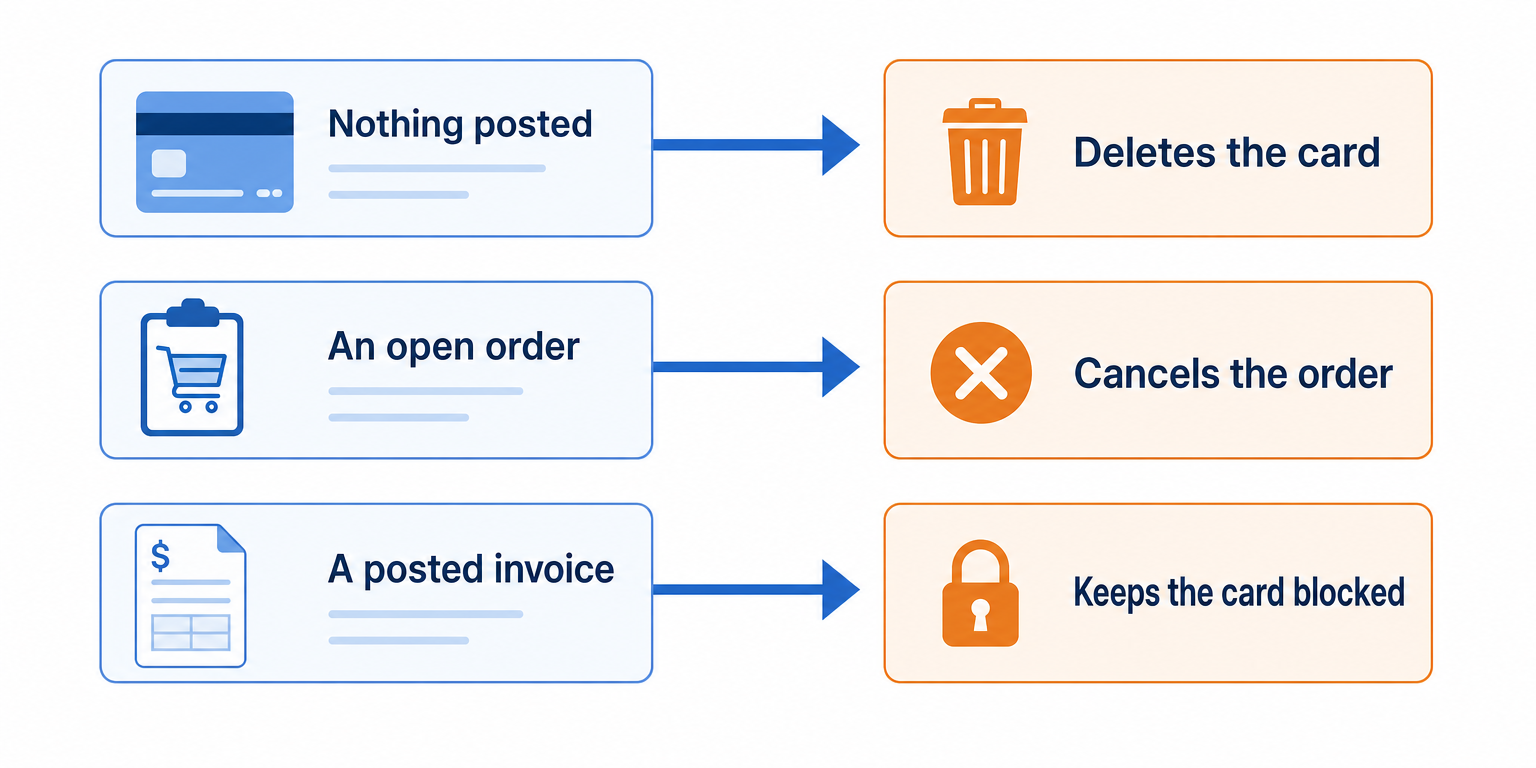
| What the card has | What finance does next |
|---|---|
| Nothing posted | Deletes the card |
| An open order | Cancels the order, then deletes the card |
| A posted invoice | Keeps the card blocked and decides on a credit memo |
Deleting is a finance decision, because only finance knows whether the ledger still needs that record.
The Premature-Record Cleanup: The Cards You Already Have
The gate stops new premature records. It does nothing about the ones you already have, and those cards still extend credit today. So run the cleanup once, before the gate goes live:
- List every customer card with no posted entries.
- Match each one to Salesforce and look for a won deal behind it.
- Block every card with no won deal, so nothing new can be ordered against it.
- Delete after a 30-day review window, once nobody has claimed the card.
Do this first, because every later check, including the duplicate check, searches against that list.
Period Cutoff: When the Gate Opens After Month End
A gate that waits for a credit decision can push a new customer past month end. A deal won on Wednesday, September 30 might not get its customer card until Thursday, October 1. Sales reports the deal in September. Finance posts the first invoice in October. Agree two rules with finance before that happens:
- The normal rule. The close date sets the sales period, while the first invoice’s posting date sets the accounting period, within the dates finance allows (Microsoft Learn). Any deal that crossed the line shows up on the gate hold list.
- The catch-up rule. After an outage over month end, the flow re-checks held deals in close-date order and flags each one it releases. Finance then dates those first invoices by hand, instead of letting them land in whichever period happens to be open.
How Aonflow Runs Qualification-Gated Customer Creation
Aonflow lets teams:
- Check all four gate conditions on every opportunity change through the pre-built Salesforce and Business Central connectors, so a deal moved back and forth never slips through on one good moment.
- Build the gate hold and the unwind rule as no-code flow steps, so the hold list and the Blocked: Ship branch are visible to anyone who reads the flow.
- Alert the condition owner in Slack or Microsoft Teams, using Aonflow’s connectors for both, when a won deal waits on a credit decision or billing identity.
- Recover a failed creation call with self-healing flows, so a dropped connection doesn’t leave a deal that passed the gate without its customer.
- Watch every gate decision on monitoring dashboards and logs, so the controller can see which deals crossed the month-end line.
Aonflow does not replace either system. Deals still live in Salesforce, and customers still live in Business Central.
A Worked Example: The Sample Order Nobody Approved
A 110-person industrial supplies distributor runs sales in Salesforce and finance in Business Central. Its old flow created a customer whenever a deal entered a stage named Qualification.
- Tuesday, May 12. A deal enters Qualification. The flow creates customer C30877 from the default template, with a blank credit limit.
- Friday, July 31. The deal is marked lost. Nothing changes in Business Central.
- Monday, September 14. A second rep, working a different contact at the same company, sends a $6,480 sample order. It flows through, because the account already has a customer number. The goods ship and the invoice posts on net 30.
- Monday, October 26. The $6,480 invoice is 12 days past due. Nobody in finance ever reviewed this customer.
The cleanup that followed found 1,312 customer cards, 486 of them with nothing ever posted. Finance blocked all 486 on day one. After the review window, it deleted 452 and kept 34 that had an open quote or a live deal.
Who Owns This When It Breaks
Who owns the flow? The accounts receivable lead, because finance lives with every card the gate lets through. Sales operations owns the won flags and the billing identity fields in Salesforce.
Who gets alerted when it fails? The condition owner, when a won deal waits on the hold list. The controller, when a deal unwinds after something has posted. The IT head, on a connection or credential failure that survives a self-healing retry.
Where do failed records wait for review? On the gate hold list, not in a log file. Each held deal shows the account, the missing condition, the close date and how long it has waited.
Escalation triggers:
| Trigger | Who acts | Within |
|---|---|---|
| A won deal on the gate hold list for more than 1 business day | Condition owner | Same day |
| A deal unwinds after an invoice has posted | Controller | 2 business days |
| A held deal closed in a month that has since ended | Controller | Before close |
| A connection failure that survives a retry | IT head | 1 hour |
Role-based access control governs who can change the flow, audit trails record what changed, and data moves over HTTPS. Those controls help once the three questions above have names against them.
FAQ
Should prospects live in Business Central at all?
Usually not. If finance wants to see them, Business Central has contacts for that, and a contact can become a customer later with the Create as action (Microsoft Learn). A contact carries no invoicing or posting details, so it extends no credit.
What about a free pilot that later converts?
The pilot never passes the amount condition, so no card exists while it runs. The card appears when the first paid amount does.
Can a rep override the gate for a rush order?
Not from Salesforce. Finance can create the card by hand and link it to the account, which keeps the credit decision with the people who own credit.
Does this slow down new customers?
Only the ones missing a condition, and the hold list says which one. A deal that arrives complete gets its customer in near real-time.
Conclusion
A customer card is an approval, whether or not anyone meant to give one. Five decisions keep that approval deliberate: the gate conditions, the gate hold, the unwind rule, the premature-record cleanup, and period cutoff. Before you change anything, count the cards in Business Central with nothing posted against them. That number is what your current trigger has been approving.
Get Started with Aonflow iPaaS – Free Trial Available!
Build and deploy your integrations at zero cost. No credit card required!