

Ten minutes into a quarterly business review, the customer’s finance lead unmutes. Your slide says the relationship was worth $486,000 last year. Their payables report says $441,500. Everyone on the call now knows which number is right, and it isn’t yours.
That moment costs more than an awkward pause. The meeting turns into a reconciliation instead of a plan. Your account manager looks like they don’t know their own customer. And the renewal target built on that slide is already $44,500 too high.
The cause is two systems answering two different questions. Salesforce knows what the customer agreed to buy. Business Central knows what finance invoiced, credited and collected. A QBR needs the second answer, so account history in Salesforce has to come from the ledger, not the pipeline. Aonflow connects Salesforce and Business Central with pre-built connectors and near real-time data sync, so finance’s figures sit on the account before anyone builds a slide.
This is for whoever runs account reviews and the systems behind them: customer success and sales leaders, revenue operations, and the finance or IT lead who decides what leaves the ERP.
Before your next QBR season, settle these six decisions, then decide who owns it:
- Value from the ledger: customer value is net invoiced revenue from Business Central, after credit memos, never the sum of closed-won deals.
- Totals, not the ledger: bring a few summary figures into Salesforce, not every transaction finance has posted.
- The recent-transactions window: show the last 90 days of invoices, credit memos and payments, newest first.
- Rollup across bill-to customers: add up every Business Central customer that belongs to one Salesforce account.
- Closed periods only: quote completed quarters, and label the open quarter as in progress.
- Who owns this when it breaks: one named owner, one alert, and one place where unmatched transactions wait.
What a Pipeline-Built QBR Costs You
A QBR shows the customer, in numbers they recognize, what the relationship has been worth. When those numbers come from the wrong system, the meeting fails in three ways.
- The customer corrects you. Their payables team knows exactly what they paid. If your figure is higher, you spend the meeting defending it.
- The forecast inherits the error. Renewal and expansion targets usually start from last year’s value. Start from pipeline, and every target sits on a number finance never booked.
- The real story stays hidden. Credits and returns show where the customer was unhappy. A pipeline total doesn’t contain them at all.
It is tempting to fix this with a process: check with finance before every QBR. However, that rule collapses in the busiest week of the quarter, when twenty reviews land at once and finance is closing the books.
What Does Account History in Salesforce Actually Show?
Out of the box, it shows who changed which fields on the account, not what the customer bought.
Salesforce’s Account History related list comes from field history tracking. It records changes on up to 20 fields per object, with the date, the user, and the old and new values (Trailhead). So, if you track the owner field, it tells you who changed the account owner last spring. However, it says nothing about invoices, credits or payments.
The closest thing Salesforce holds to purchase history is the opportunity. An opportunity’s amount is the estimated total sale amount (Salesforce Developers). In other words, it records what someone expected the deal to be worth. It does not record what shipped, what finance billed, or what the customer kept. So the QBR view has to be built, and the only question is which system it comes from.
Value From the Ledger
The natural instinct is to treat the CRM as the record of the relationship. The deals are there, the amounts are there, and a report adds them up in seconds.
However, a deal can close and still never reach a full invoice. A phase slips into next year. A shipment comes back. Finance cancels an invoice and reissues it at a lower price. Business Central handles each of those through the ledger. For example, when finance cancels or corrects a posted sales invoice, Business Central creates and posts a corrective credit memo that reverses the original in the financial records (Microsoft Learn). Salesforce never sees that credit unless something carries it across.
The Rule: closed-won is what the customer agreed to buy, and net invoiced is what they actually bought, so a QBR quotes the ledger, never the pipeline.
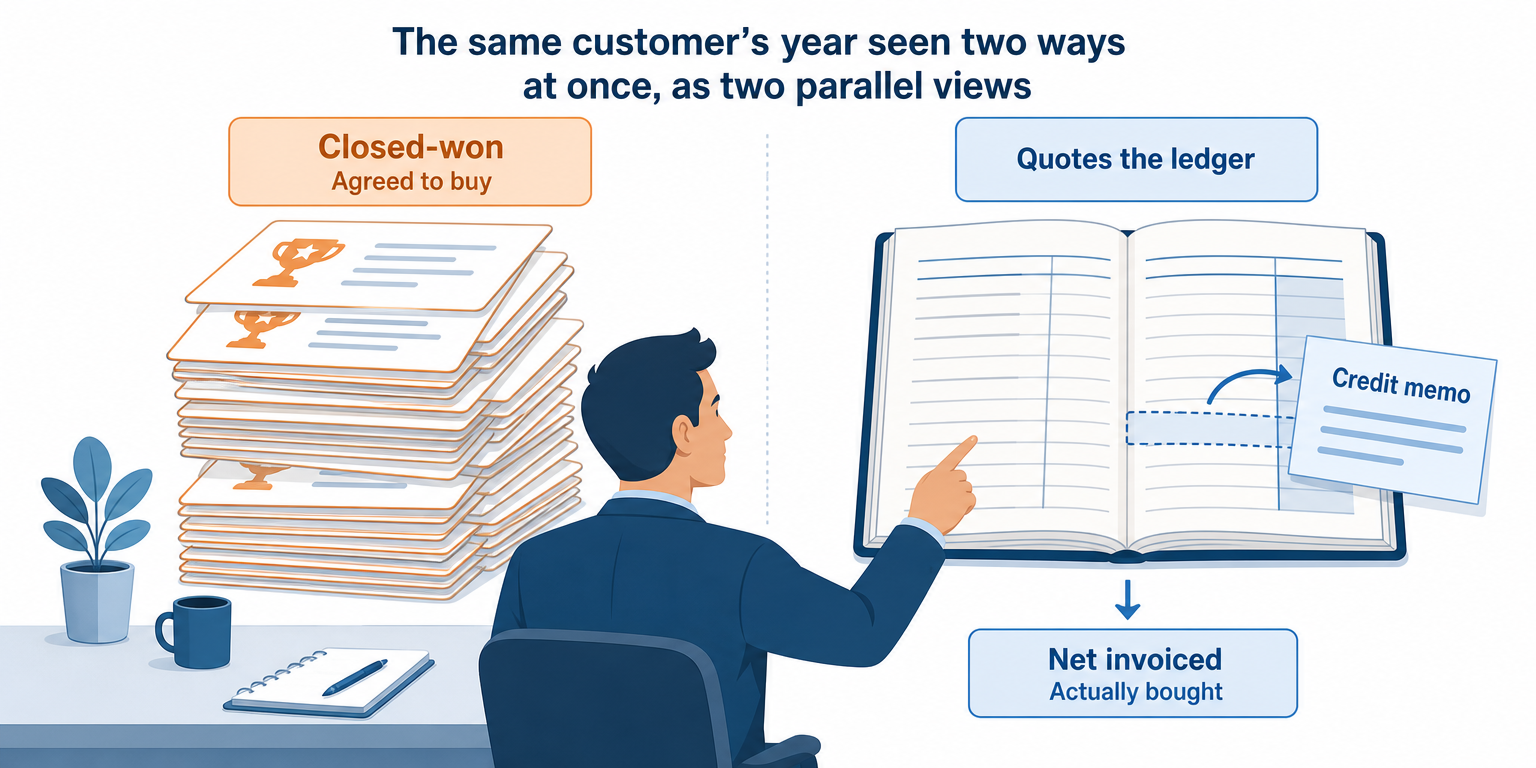
This doesn’t make the pipeline wrong. It answers a different question. Commitments are still worth showing, as long as the slide calls them commitments, not value.
Totals, Not the Ledger
Once the systems connect, the next instinct is to copy every invoice line into Salesforce. Resist it. Hundreds of ledger lines on an account page don’t tell a story, and they turn Salesforce into a second ledger that finance never reconciles.
Instead, the flow calculates a handful of figures from Business Central and shows them read-only on the account:
| Figure | What it tells the account manager | How often it refreshes |
|---|---|---|
| Net invoiced, last four closed quarters | What the customer actually spent with you | When each quarter closes |
| Net invoiced, same quarter last year | Whether the account is growing or shrinking | When each quarter closes |
| Credits issued, last four closed quarters | Where value went back: returns, corrections, disputes | When each quarter closes |
| Open quarter to date | What has been invoiced so far, labeled as in progress | Daily |
| Last invoice date | Whether the account has gone quiet | Daily |
Finance owns these numbers, and Salesforce only shows them. Our guide to Business Central data in Salesforce covers the live balance and credit fields; this view adds the history behind them.
The Recent-Transactions Window
Totals answer “how much.” However, the customer will also ask “what happened,” so the account manager needs the documents themselves, in a short window.
A related list on the account works well: one row per document, newest first, covering the last 90 days. Each row shows the type, number, posting date and amount. It covers three kinds of document:
- Invoices, because they show what you delivered and billed most recently.
- Credit memos, because each one is a conversation to have before the customer raises it.
- Payments, because a customer who paid late twice this quarter is telling you something.
Ninety days is a starting point, not a law. Here is advice that has nothing to do with software: pull your last ten QBR decks and check how far back anyone actually looked. Pick that window.
Rollup Across Bill-To Customers
This failure catches most teams on their first QBR. One customer in Salesforce often appears as several customers in Business Central. For example, a head office and two branches might each have a customer record, because finance bills each one separately.
If the flow matches only one record, the QBR view quietly shows a fraction of the relationship. Nothing errors. The number just looks small.
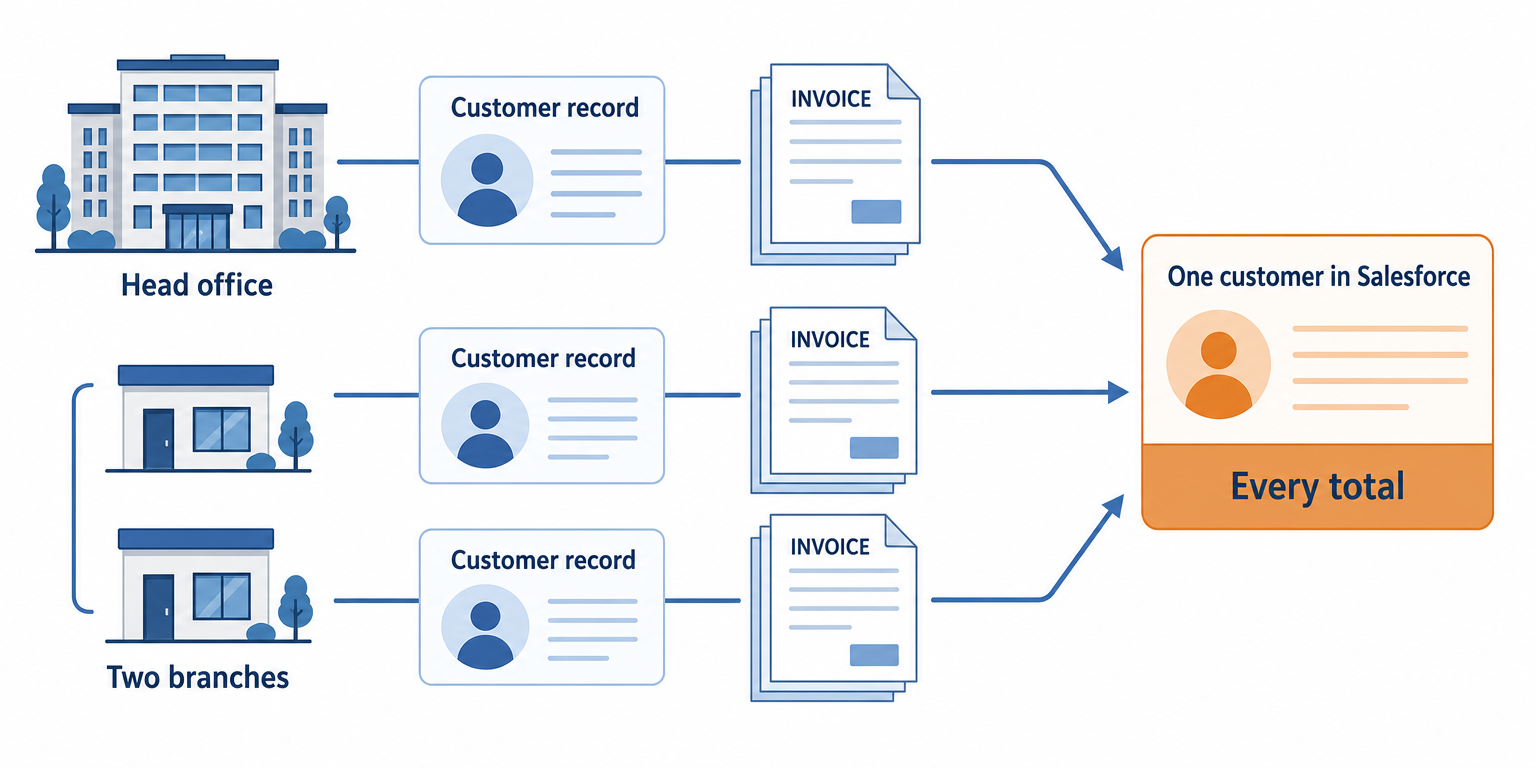
The fix is a decision, made once: which Business Central customer numbers belong to which Salesforce account. Store that list on the account, and calculate every total across all of it. Then, whenever finance creates a new customer record for an existing account, someone adds it. Otherwise, its invoices never reach the view.
Closed Periods Only
Because these are finance numbers, timing is an accounting question, not just a speed question. Business Central places each transaction in a period by its posting date. Finance controls which dates stay open through settings such as Allow Posting From and Allow Posting To (Microsoft Learn).
So the QBR view must handle three cases the same way every time:
| Situation | Which quarter it lands in | What the QBR view shows |
|---|---|---|
| Return agreed September 28, credit memo posted October 3 | Q4, by posting date | Q3 unchanged; the credit shows in the open quarter |
| Flow down over quarter end | Each posting date’s own quarter | Closed quarters recalculated from the ledger on catch-up |
| Adjustment posted into a reopened quarter | The original quarter | The closed total changes, and the flow owner gets an alert |
The catch-up rule matters most. When a flow resumes after an outage, it recalculates each closed quarter from the ledger. It never adds missed transactions to the current quarter, because that inflates one quarter and shrinks another. Finally, label the open quarter as in progress, so nobody quotes a number that can still move.
How Aonflow Builds the QBR View
With the decisions made, the build is configuration, not a development project. Each capability ties back to a decision above.
Aonflow lets teams:
- Connect both systems with pre-built connectors for Salesforce and Business Central, so value from the ledger reaches the account.
- Use AI-assisted mapping to line up the Business Central ledger fields with the Salesforce figures they feed, which reduces integration time by more than half.
- Build the quarter totals in a workflow that moves and transforms ledger entries, so Salesforce gets totals, not the ledger.
- Keep the recent-transactions window current with near real-time data sync, so this morning’s credit memo is visible before this afternoon’s call.
- Watch every run with dashboards, logs and alerts, so a stalled or failed flow surfaces before the QBR, not during it.
- Recover breaking flows with self-healing, which shortens the outages the catch-up rule exists to repair.
Aonflow connects and orchestrates the systems you already run. Business Central still owns the numbers, and Salesforce still owns the relationship.
A Worked Example: One QBR, Two Totals
A regional distributor buys from you through three Business Central customer records: its head office and two branches. In Salesforce, it is one account. The QBR covers the four quarters through September 30, 2026.
Salesforce shows $486,000 in closed-won deals for that period. Business Central tells a different story. Finance invoiced the three records $312,000, $96,000 and $42,000, which is $450,000 in total. The other $36,000 is a phase-two rollout that slipped into next year. Finance also posted an $8,500 credit memo for a returned shipment, against the head office. So the net invoiced figure is $441,500.
Before the flow existed, the account linked to the head office record only, so it showed even less: $303,500. That makes three numbers for one customer, and only one matches the customer’s own books.
With the QBR view in place, the account manager opens with $441,500 and names the $36,000 phase two as a commitment still to deliver. Then they raise the $8,500 return before the customer does. The conversation moves straight to next year.
Who Owns This When It Breaks
Who owns the flow? Revenue operations, jointly with a named finance systems owner. Revenue operations owns the account mapping. Finance owns the definition of net invoiced and decides which figures are safe to show.
Who gets alerted when it fails? The flow owner, on the first failed run. If a closed-quarter total changes after close, the finance systems owner gets an alert too, because the books moved.
Where do failed records wait for review? Transactions that match no Salesforce account stay out of the totals and wait on an exception list. The flow owner reviews it weekly, and daily in the two weeks before QBR season. Aonflow’s logs and alerts show the flow owner when a run fails.
Then wire these escalation triggers:
| Trigger | Who acts |
|---|---|
| A Business Central customer posts an invoice but matches no Salesforce account | Revenue operations |
| A closed-quarter total changes after the period closed | Finance systems owner |
| The recent-transactions window hasn’t refreshed in 24 hours | Flow owner |
Security stays within the confirmed posture: data moves over HTTPS, the flow reads Business Central with read-only token access, and role-based access control decides who sees the figures.
FAQ
Can we show margin or profit in the QBR view?
Most teams shouldn’t. Margin is finance’s working data, and it rarely belongs on a page a customer-facing team can share.
How many quarters of history should we bring across?
Four closed quarters plus the same quarter last year covers most QBRs. Older history can stay in Business Central reporting.
What if we invoice the customer in more than one currency?
Decide once whether the view shows the invoice currency or your reporting currency, and label it on the page. Adding the two together in one total is the fastest way to a wrong number.
Does building this need a developer?
You can build the flow without code. You do need someone who knows which Business Central customer numbers belong to which account.
Conclusion
A QBR view comes down to five decisions: value from the ledger; totals, not the ledger; the recent-transactions window; rollup across bill-to customers; and closed periods only. They are easier to make before the first sync than after it. Then decide who owns this when it breaks, and your account manager walks in with the customer’s own number.
Before your next QBR season, ask finance for one customer’s net invoiced figure for the last four quarters. Compare it with the closed-won total in Salesforce. The gap is the size of the problem.
Get Started with Aonflow iPaaS – Free Trial Available!
Build and deploy your integrations at zero cost. No credit card required!