
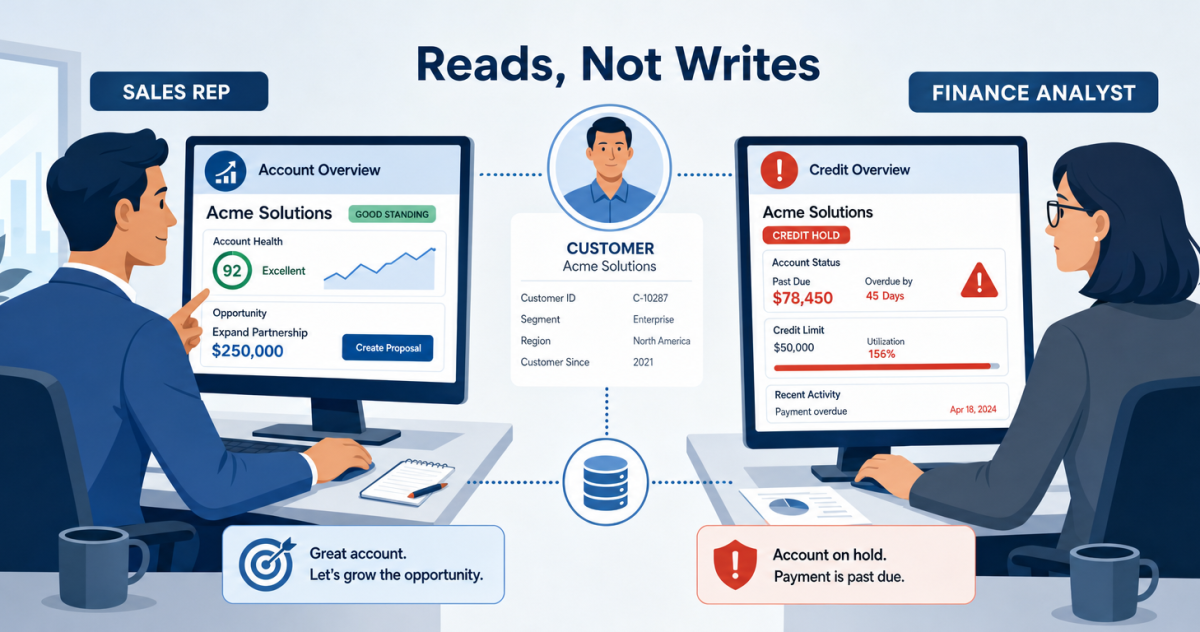
On Tuesday morning, a rep opens a customer’s account in Salesforce. The relationship looks healthy, a renewal is due, and the notes are warm. So the rep sends a quote for a larger package. Everything visible in the CRM says go.
What the rep cannot see is that the same customer is $18,200 past due in finance and was placed on credit hold last week. So the quote goes out, the customer feels chased for money and courted for more on the same day, and finance has to quietly unwind a deal that should never have left the building. The cost is not just an awkward call. It is a forecast built on a number finance already knows is wrong, and a relationship dented for no reason.
The fix is not another standing meeting between sales and finance. It is putting the few finance numbers that actually change a conversation directly onto the Salesforce record the rep already lives in. Aonflow connects Business Central and Salesforce with pre-built connectors and near real-time data sync, so a rep sees a customer’s real financial standing without leaving the CRM and without asking anyone.
This runs technical in places, so it helps to say who it is for: whoever owns the customer conversation and the numbers behind it. Sales leaders, revenue operations, and the finance and IT leads who decide what a rep is allowed to see.
Before you surface anything, resolve these five decisions:
- Which fields to surface: the handful that change what a rep says, not everything finance tracks.
- Read-only by design: Salesforce displays the Business Central numbers, it never owns or edits them.
- Where each field belongs: on the account, on the opportunity, or in a related list.
- How fresh is fresh enough: near real-time for credit and hold status, once a day for lifetime totals.
- Who owns the flow when it breaks: and where a stale or missing field gets caught.
What Reps Can’t See Costs You a Deal
Nobody decides to sell to a customer on credit hold. It happens because the person making the promise and the person holding the ledger are looking at different screens.
The cost lands in three familiar places. First, the wrong conversation: a rep runs an upsell on an account finance is actively chasing for payment. Second, the wrong answer: a customer asks where their order is, and the rep guesses, because order status lives in Business Central and the rep only has Salesforce. Third, the wrong forecast: pipeline gets built on accounts finance will not ship to, so the number on the board and the number in the ledger drift apart.
It is tempting to answer this with a process, a rule that reps must check with finance before quoting a large deal. However, that rule fails the first busy week. People do not check a second system in the middle of a live call, and a control that depends on someone remembering to leave the CRM is not a control.
The Fields That Change the Conversation
The instinct, once you connect the two systems, is to bring everything across. Finance has hundreds of fields on a customer, so why not show them all?
Because a rep does not need finance’s whole ledger. A rep needs the four or five numbers that change what they are about to say. Everything else is noise that buries the one field that mattered.
The short list is smaller than most teams expect:
| Business Central field | What it changes for the rep | Where it lands in Salesforce |
|---|---|---|
| Credit limit and available credit | Whether there is room for a bigger order, or finance must sign off first | Account |
| Outstanding balance | Whether this is a sales call or, quietly, a collections one | Account |
| Credit hold or blocked status | Whether an order can ship or be invoiced at all | Account, mirrored on the opportunity |
| Open order and invoice status | What to tell a customer chasing a delivery, without guessing | Related list |
| Payment history | How the customer actually pays, which shapes the next deal | Account |
Business Central holds credit on the customer card, where the Credit Limit field sets the amount a customer’s balance may exceed before warnings fire, and Balance Due is the number finance watches (Microsoft Learn). Notice what is not on the list: cost of goods, margin, tax detail, ledger dimensions. Those are finance’s working data, not a rep’s decision data. Leave them in Business Central.
Read, Don’t Sync
Here is where most first attempts go wrong. A team connects the two systems, sees the finance fields appear in Salesforce, and then lets reps edit them, because that is how CRM fields normally behave. Within a month, a rep has “corrected” a balance they thought was stale, and now two systems hold two different numbers with no way to say which is right.
It is natural to treat this as a sync, two systems kept in agreement, each free to change its copy. It is not. This is a one-way read: finance owns the number, and Salesforce shows a picture of it.
The Rule: Salesforce should display finance’s numbers, never own them, so every Business Central field a rep sees is read-only by design.
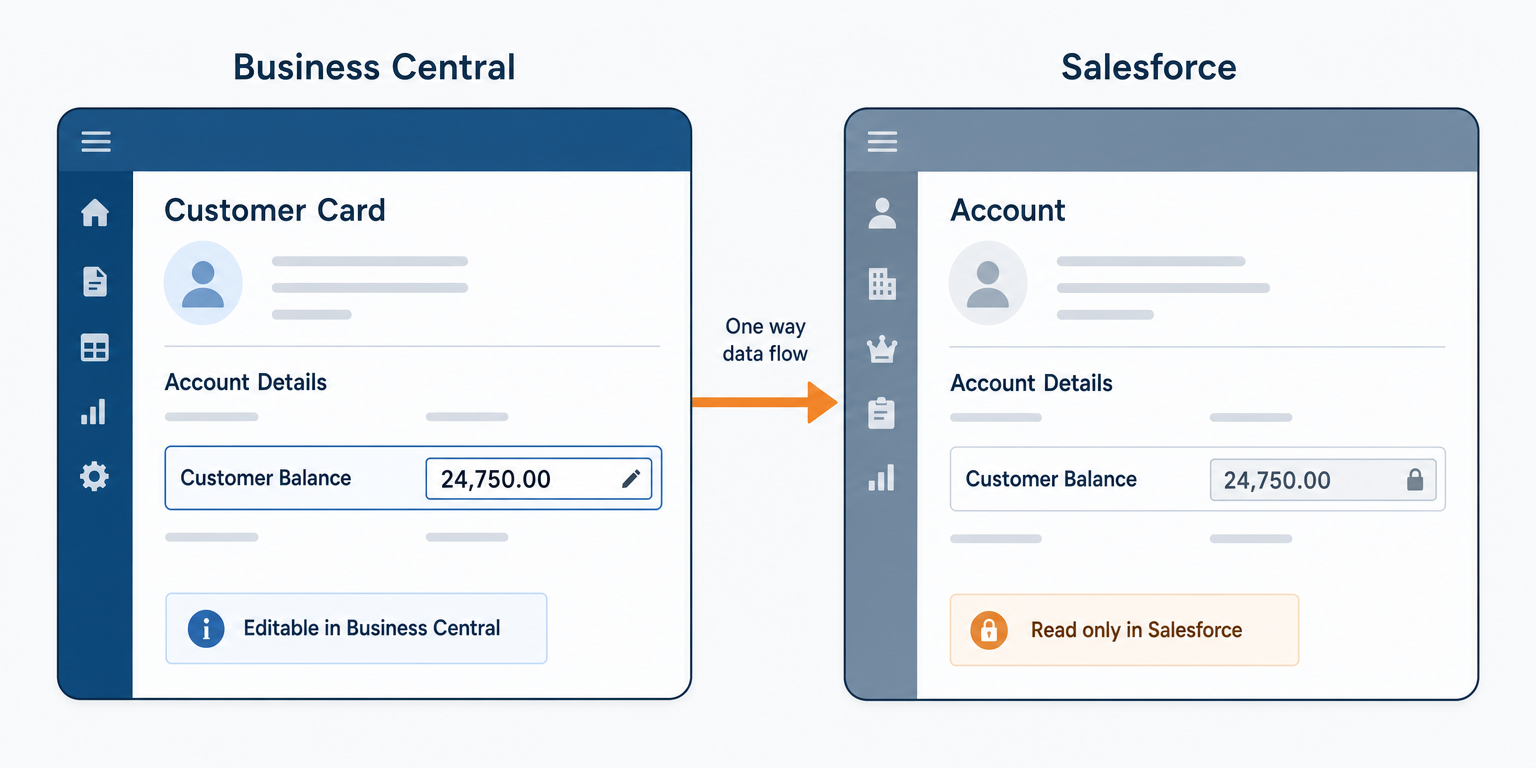
In practice, that means these fields are locked at the field level in Salesforce, visible to the profiles that need them and editable by nobody. Salesforce field-level security exists precisely for this: an administrator can mark a field visible but read-only for a profile, independent of the page layout (Salesforce Help). The rep reads the truth. Only Business Central writes it. This is one flow in a wider relationship, and our guide to Business Central to Salesforce integration works through who owns which record across all of them.
Where Each Field Belongs
A field surfaced in the wrong place is nearly as useless as one that is missing. Credit status buried three clicks deep does not stop a bad quote.
Most of these fields belong at the account level, because they describe the customer relationship as a whole: credit limit, balance, hold status, payment history. Put them where the rep opens the account, high on the record, not in a tab nobody visits.
A few belong on the opportunity. When a rep is working a specific deal, a credit-hold warning right on that opportunity is what actually changes behavior in the moment. The account-level field is the source, and the opportunity simply reflects it so the warning sits where the work is.
Order and invoice status often reads best as a related list, one row per open document, rather than a single field, because a customer usually has more than one order in flight.
How Fresh Is Fresh Enough
Not every field needs the same speed, and pretending they do wastes effort. Credit hold and blocked status need to be near real-time. A hold placed at 9 a.m. that a rep does not see until tomorrow has failed at its one job. Balance and available credit should update through the day. Lifetime revenue and payment averages can refresh once a day, because they move slowly and nobody makes a snap decision on them.
Because these are finance numbers, timing is also an accounting question, not only a speed one. A balance that updates near real-time will swing across a month-end close as finance posts entries. So decide, and tell reps, whether the balance they see reflects the current open period or the last closed one. And if the flow is down over the cutoff, the catch-up rule matters: when it resumes, it should bring each account to finance’s current state, not replay a stale mid-close snapshot showing a balance that is no longer true.
How Aonflow Surfaces Business Central Data in Salesforce
With the decisions made, here is how the flow runs on Aonflow, and each capability ties back to a decision above.
Aonflow lets teams:
- Connect both systems with pre-built connectors for Business Central and Salesforce, so choosing which fields to surface is a configuration step, not a development project.
- Use AI-assisted mapping to line up the customer card fields with their Salesforce targets, which reduces integration time by more than half and speeds the field-selection and placement decisions.
- Run a one-way, near real-time flow that reads the chosen fields onto the account and opportunity, matching the read-only design and the per-field cadence.
- Monitor every run with dashboards and alerts, so a hold that stops refreshing surfaces as a failure instead of a silent stale field.
- Recover breaking flows with self-healing, so a transient outage does not leave the finance fields quietly frozen.
Aonflow connects and orchestrates the systems you already run. Business Central still owns the numbers, and Salesforce still owns the sales process. The flow only carries the read between them.
A Worked Example: One Renewal Call, Two Screens
A renewal is due on a mid-market account. In Salesforce, the rep sees an $18,200 open balance, $6,500 past 60 days, and a clear flag: on credit hold. Before this flow existed, none of that was visible, and the rep would have sent a renewal quote for a larger tier.

Instead, the rep sees the hold on the opportunity and changes the call. Rather than pitching an upgrade, the rep opens with the overdue balance, helps the customer clear it, and lines up the renewal for once the hold lifts. Finance never has to intervene, because the rep had the same number finance had. One customer, one truth, two screens showing the same thing.
Who Owns This When It Breaks
A flow that surfaces finance data into a sales tool needs an owner before it needs anything else.
Who owns the flow? Revenue operations, jointly with a named finance systems owner. Sales sets which fields reps need, finance confirms which numbers are safe to expose, and one named person owns the mapping between them.
Who gets alerted when it fails? The flow owner in revenue operations, on the first failure. If credit or hold status specifically stops updating, finance is alerted too, because a stale hold flag is a financial risk, not just a data gap.
Where do failed records wait for review? In an exception queue, not silently dropped. An account whose finance fields could not refresh is flagged as stale in Salesforce, so a rep can see the data is old rather than trusting a number from last week as if it were current.
Then wire these escalation triggers:
| Trigger | Who acts |
|---|---|
| Credit or hold status has not refreshed within its expected window | Flow owner, and finance |
| A Salesforce account cannot be matched to a Business Central customer | Revenue operations |
| A field that was populated before arrives blank | Flow owner |
Security stays within the confirmed posture: data moves over HTTPS, access uses read-only tokens on the source side, and role-based access control decides which profiles see the finance fields at all.
FAQ
Should this ever write back to Business Central?
For this use case, no. The whole point is a one-way read: finance owns the numbers, Salesforce shows them. Writing back turns a safe display into a two-system disagreement.
How many fields should we start with?
Three: balance, credit hold, and available credit. Add order status once reps trust the first three.
Won’t showing balances to reps cause friction with finance?
It usually reduces it. Finance stops fielding “can I quote this account” questions, and reps stop making promises finance has to unwind.
Does this need a developer?
No code is required to build the flow, though you do need someone who knows how your finance data is set up to choose the right fields.
Does this replace Business Central reporting or a finance portal?
No. It surfaces a handful of decision-relevant fields where reps work. Deep financial reporting stays in Business Central for the people who need it.
Conclusion
The work here is not the connection. It is five decisions: which fields to surface, keeping them read-only, where each one belongs, how fresh each needs to be, and who owns the flow when it breaks. Teams that struggle usually brought every field across and let reps edit them, then wondered why the numbers stopped agreeing.
Before you surface anything, take your most awkward recent account, the one where a rep quoted a customer finance was chasing, and list the three fields that would have stopped it. Surface those first.
Get Started with Aonflow iPaaS – Free Trial Available!
Build and deploy your integrations at zero cost. No credit card required!