

A quote goes out on Tuesday for $48,600. The customer’s procurement lead approves it on Friday at 4:52 pm. Sales marks the deal won, and everyone treats the money as booked.
The invoice leaves 9 days later. Those 9 days sit inside your payment terms, so net 30 behaves like net 39. A quarter you thought you closed still has cash in someone else’s accounts payable queue.
Yet nobody inside your company experienced a delay. Sales finished on Friday. Finance started when the order appeared. The time vanished into the space between the two systems. So the instinct is to assume the fix is speed. It is not. Quote-to-cash gets shorter when the sales order arrives complete, not when it arrives sooner.
Aonflow connects CRM and ERP with pre-built connectors, no-code flow building and near real-time data sync. An approved quote becomes a sales order without anyone re-keying it. This post is for whoever owns the cash cycle: sales operations leads, controllers, and hands-on founders. The decisions below hold on any integration platform.
What this post resolves:
- The approval gate decides what “approved” has to mean before an order is created at all.
- Line and price mapping decides which system owns the price once the customer has said yes.
- The missing PO number is usually the field that stops the invoice, not the order.
- Period cutoff decides which accounting period a late order lands in.
- Quote revisions after approval decide whether your ERP holds the version the customer signed.
- Escalation triggers decide who gets called, and how fast, when the flow stops.
What Actually Slows Quote-to-Cash
Ask a sales leader how long quote-to-cash takes and you get the sales cycle. Ask a controller and you get days sales outstanding. Neither number contains the handoff, because the handoff belongs to nobody’s dashboard.
Here is what fills it. The approved quote waits in the CRM until sales ops notices it. That person opens the ERP and starts typing the order in. Halfway through, something stops them: no customer record, no matching item code, or no purchase order number. So they send an email and move on, and the order waits for the reply.
It is tempting to respond by making the hop faster. But an order created in 4 seconds and then held for 6 days is not a faster cycle. It is the same cycle with a better-looking log.
The Rule: quote-to-cash does not get shorter because the order arrives faster, it gets shorter because the order arrives complete.
The Approval Gate: What “Approved” Has to Mean
Approval looks like one event. It is two, and they belong to different parties.
On the CRM side, a HubSpot quote carries an internal status that moves through draft, pending approval and approved. It also carries a separate signature status once the buyer signs. Both appear in HubSpot’s quote properties reference. That is your commercial sign-off.
On the ERP side, NetSuite runs its own approval on the sales order. A new order starts as pending approval and only then moves to pending fulfillment, which Oracle documents as a distinct step with its own status.
That approval is not about the customer at all. Instead, it asks whether your business will commit stock, book revenue and extend credit on these terms.
The Rule: an approved quote is a promise to your customer. A sales order is an instruction to your own company.
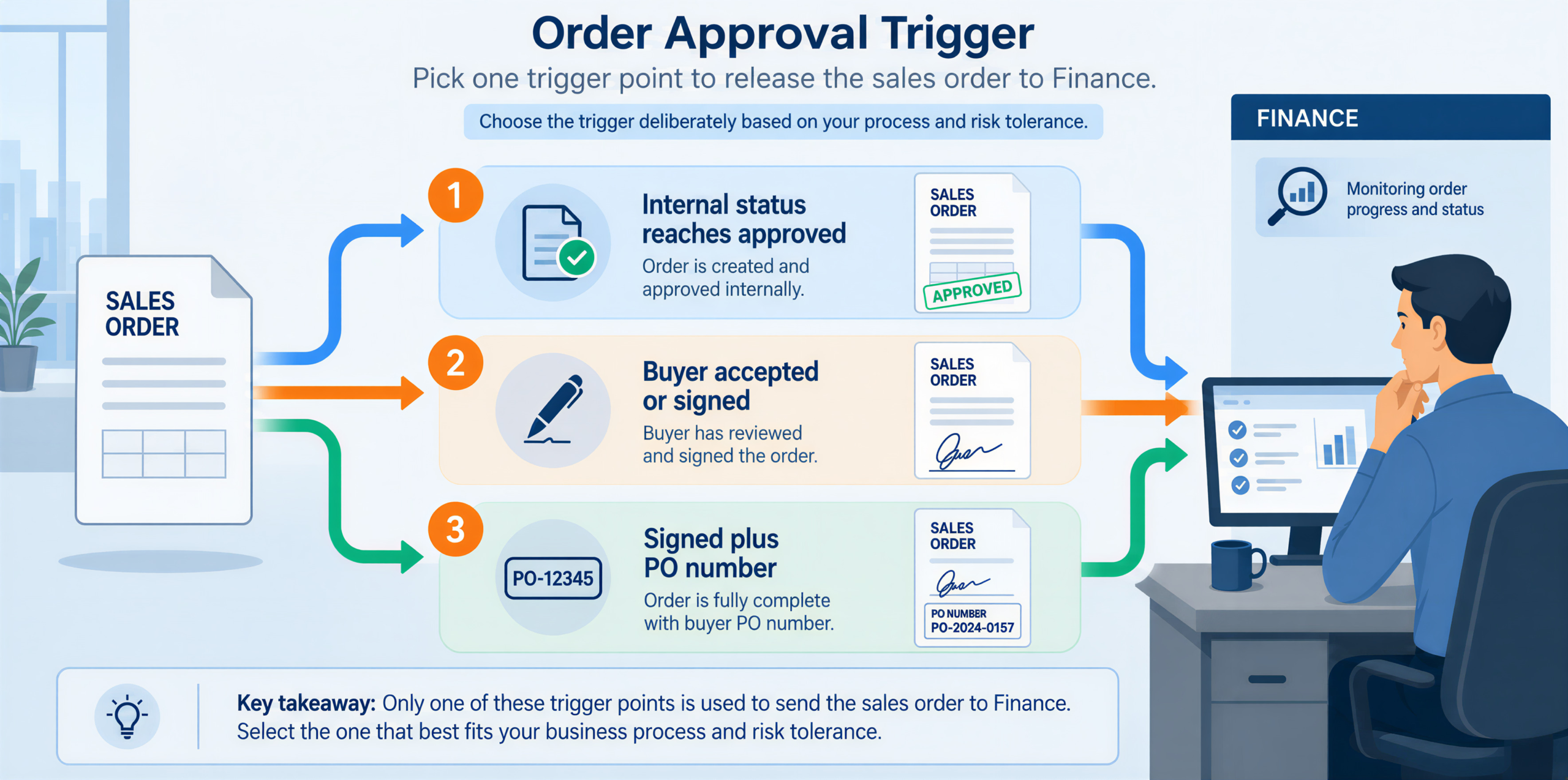
So pick the trigger deliberately:
| Trigger | What it buys you | What it costs |
|---|---|---|
| Internal status reaches approved | The fastest possible order | Orders for deals the buyer has not signed |
| Buyer has accepted or signed | The customer is committed | A few hours, sometimes a day |
| Signed, plus a customer PO number captured | An order an invoice can leave against | A dependency on the buyer’s procurement team |
Most teams chasing a shorter cycle take the middle row. They then treat a missing purchase order number as an exception, not a blocker.
Line and Price Mapping: Which System Owns the Price
A quote and a sales order hold overlapping data and answer different questions. So this is a translation, not a copy.
| What the quote holds | Where it lands on the sales order | The decision you have to make |
|---|---|---|
| Associated company | Customer / entity | Match on an identifier, never on company name |
| Quote line item | Sales order line | Does the CRM product carry the ERP item code? |
| Line price | Rate | Which system owns price after approval? |
| Total discount | Discount | May the ERP recalculate it independently? |
| Quote number | External reference | Needed for traceability in both directions |
| Customer PO number | Customer PO field | Mandatory for your buyer’s AP system? |
| Approval date | Transaction date | Which period should this order belong to? |
Tax deserves its own answer. A HubSpot quote can carry a calculated tax total and an aggregated discount as read-only properties. NetSuite calculates its own: with tax lookup enabled, it determines the tax code and rate from the customer’s shipping address. If both run, one order carries two numbers, and the invoice figure will not match what the customer approved. So pick one authority per field. In practice, price and discount come from the approved quote, because that is what the customer agreed to. Tax comes from the ERP, because that is where the jurisdiction rules live.
The Missing PO Number: The Field That Stops the Invoice
This is the smallest field in the table above and the most common reason cash sits still. Many buyers reject an invoice that does not quote their own purchase order number. Their accounts payable system bounces it without a human ever reading it.
HubSpot stores the buyer’s purchase order number on the quote. NetSuite has its own reference field on the sales order for the same value. If the quote has one, carry it across. If it does not, create the order anyway and flag it.
Treating a missing purchase order number as a hard failure is the common mistake.
The Rule: a missing PO number blocks the invoice. It doesn’t block the order.
The account owner can unblock it, not the integration. That is the difference between a held order and a failed one. The held order is the more dangerous of the two, because it looks correct on every screen.
Period Cutoff: Which Period a Late Order Lands In

At month end the handoff stops being a speed question and becomes an accounting one.
A quote approved at 6:10 pm on 31 March is March revenue in everyone’s head. But in NetSuite, the transaction date on a sales order defaults to the date the record is created if you leave the field blank. Oracle states this plainly in its guide to creating sales orders. So if your flow retries overnight and writes the order at 00:20 on 1 April, that order is April.
One order in the wrong month is an annoyance. However, a catch-up run after an outage moves an entire afternoon of orders across the cutoff at once. Then it is a variance the controller has to explain. Choose the rule before you need it:
- Date the order from the quote approval timestamp when the commercial event is what matters. A retry at 00:20 on 1 April still books to March.
- Date the order from creation time when your controls require the ERP record and the accounting entry to agree exactly.
Then write the catch-up rule for an outage that spans the cutoff, and put it in the close checklist rather than in someone’s memory.
Quote Revisions After Approval: Which Version Your ERP Holds
Quotes change after approval more often than anyone plans for. A rep adjusts a line, procurement asks for a different start date, or a second approver adds a condition.
The failure here is quiet. The ERP holds the version that existed when the flow ran. The CRM holds the version everyone is talking about. Nobody notices until the customer disputes an invoice line.
So write the sales order number back onto the quote as soon as the order exists. Then treat any later edit to an ordered quote as an exception to review, not as an update to replay. A released order should never be overwritten silently.
One piece of advice that sells nothing: before you build, pull your last 20 approved quotes and count how many changed after approval. If the answer is more than 2, design the exception path first and the happy path second.
How Aonflow Runs This Flow
Aonflow has dedicated connectors for both HubSpot and NetSuite, so this is configuration rather than a development project. The connectors are the easy part, and the list below maps to the decisions above.
Aonflow lets teams:
- Build the flow in a no-code designer, including natural-language flow building, so sales ops owns the approval-gate trigger without filing an IT ticket.
- Use AI-assisted field mapping for the quote-line-to-item-record work in the mapping table. That is where build time actually goes, and it is why Aonflow reduces integration time by more than half.
- Sync in near real-time, so the order number writes back to the quote while the rep is still looking at it. That is what makes the revision check above workable.
- Run self-healing flows that detect and recover a failing connection. An overnight credential expiry then stops short of becoming a batch of orders written on the wrong side of the cutoff.
- Monitor, log and alert by failure reason, so a held order with no purchase order number surfaces the same day instead of at close.
- Apply role-based access control and audit trails, so the person who can change the posting-date rule is not the person who can approve a discount.
A Worked Example: One Approved Quote, Two Systems
A manufacturer runs sales in HubSpot and finance in NetSuite. Quote HS-4417 goes to a new customer for $48,600 across 4 lines. It carries a 12% discount on the two largest lines and a tax total of $3,888. The buyer signs at 4:52 pm on Friday.
The flow creates the sales order at 4:53 pm. Three things then surface that the manual process would not have found until Tuesday:
- The customer does not exist in NetSuite. So the order is created against a held status, and a sales ops task is raised. The customer card exists by Monday at 09:10.
- The purchase order number on the quote is empty, so the order is flagged. The account owner emails procurement on Friday evening and has the number by Monday noon.
- NetSuite recalculates tax from the ship-to address and returns $4,012, which is $124 above the quote. That crosses the $100 variance threshold. The finance lead reviews it, confirms the quote used a default rate, and releases the order.
The invoice leaves Monday afternoon instead of the following Wednesday. Nothing was automated away. Instead, 4 days of waiting became 3 named tasks with owners, and that is the entire difference.
Who Owns This When It Breaks
Who owns the flow? Sales operations owns the trigger condition and the mapping, because both encode commercial policy. Finance owns the posting-date rule, the tax authority and the credit check. IT owns the connection and its credentials. Name those three people before go-live.
Who gets alerted when it fails? Alerts route by cause, not by system. Catalogue and mapping failures go to sales ops. Period, variance and credit failures go to the finance lead. Connection and credential failures go to IT. One shared inbox for all three means nobody owns any of them.
Where do failed records wait for review? In a named held-order queue. Each record carries its failure reason and its source quote number, and someone reviews the queue at a fixed time every business day. A record that fails silently and retries forever is the failure mode to design against.
Escalation triggers:
| Trigger | Who acts | Within |
|---|---|---|
| An approved quote with no matching ERP customer | Sales ops | Same business day |
| An order created with no customer purchase order number | Account owner | Same business day |
| Order total differs from the approved quote total by more than your threshold | Finance lead | Before the invoice run |
| A posting date that falls outside the open period | Finance lead | Before the close runs |
| A connection or credential failure that survives a retry | IT owner | 1 hour |
Aonflow’s confirmed security posture covers this flow: encrypted transport over HTTPS and read-only token access, alongside role-based access control and audit trails on the platform.
FAQs
Does this replace our CPQ tool?
No. Aonflow does not configure, price or approve a quote. It moves the approved outcome into the system that bills it, and keeps the two records tied to each other.
What if we quote in one currency and bill in another?
Decide which system is the authority before you build. HubSpot records the quote currency and the amount in your company currency as separate properties, so map one of them consistently rather than converting inside the flow.
Can we run this in both directions?
The order number, order status and invoice reference are worth writing back to the CRM. Full two-way sync of commercial terms rarely is, because it gives one figure two owners.
How do we test it before go-live?
On your ugliest real quotes, not clean samples. Use one with a discount changed mid-quote, one for a brand new customer, and one approved at 5 pm on the last day of a month.
Conclusion
The handoff from an approved quote to a sales order is short, unglamorous and almost never measured. Yet a meaningful part of your quote-to-cash cycle hides inside it. Settle the approval gate, the line and price mapping, the missing PO number, the period cutoff, the quote revisions after approval and the escalation triggers. Then the order stops arriving half-finished.
Before your next quarter close, pull 10 of last month’s approved quotes and time the gap between approval and first invoice. That number tells you which of the six decisions above you have not made yet.
Get Started with Aonflow iPaaS – Free Trial Available!
Build and deploy your integrations at zero cost. No credit card required!